

Managing Reports › Key Performance Indicators › System KPIs
System KPIs
System KPIs enable you to collect metric data related to the operation of CA SDM processes.
The following process types are supported:
- domsrvr—The CA SDM Object Manager (server process). The Object Manager also caches various records and tables for clients.
- bpvirtdb—The BOP Virtual Database server enables operation of multiple Object Managers in the CA SDM environment. The Object Managers connect to the virtual database which arbitrates their access to database agents. For example, when retrieving a new range of ticket reference numbers, the virtual database ensures that only one Object Manager at a time accesses the table containing the reference numbers.
Depending on your CA SDM configuration, the Object Managers connect to the virtual database of the following servers:
- Conventional: All Object Managers running on primary or secondary server connect to the virtual database of the primary server.
- Advanced availability: All Objects Managers connect to the virtual database of the same server that it is running on. For example, object managers running on the application server connect to the virtual database of the application server only.
The virtual database also performs caching of database information for Object Managers.
- db_agents—Database agents perform SQL queries, and handle other interactions between CA SDM and the database management system (DBMS). Database Agents adhere to the CA SDM database schema, and translate the SQL code to the form required by the particular DBMS (for example, Oracle).
- webengine—The CA SDM component that connects web browsers to an Object Manager through a pdmweb cgi running on a Microsoft IIS or Apache Tomcat web server.
Depending on your CA SDM configuration, there must be a web engine for WSP on the following servers for WSP Schema Designer to write schema files:
- Conventional: Primary server
- Advanced availability: Background server
Web engines are the true client of an Object Manager for user client web browsers. Web engines cache .htmpl web forms for connected users. You can manipulate the cache using the pdm_webcache utility and see client connection statistics using the pdm_webstat utility.
Note: For more information about these processes, see the Implementation Guide.
The following diagram illustrates data flow for System KPIs.
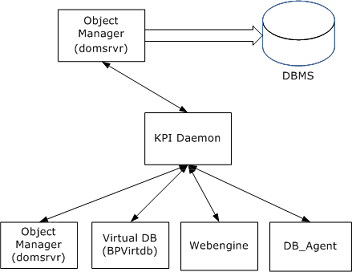
Each system KPI produce one of the following metric types:
System KPI Examples
- This example produces a count of the update requests sent to BOP Virtual Database:
updateCt
- This example reports how long requests for updates, inserts, and deletes to BOP Virtual Database took to complete:
virtdbUpdateResponseDt
Copyright © 2013 CA.
All rights reserved.
|
|