

A Gateway with OAuth installed may be vulnerable to unauthorized access due to the following issues:
Important! No known exploitations of this vulnerability have occurred at sites running the affected software.
Note: OAuth policies may be vulnerable if the SAML token grant type policy branches are present, regardless of whether they are actually used.
Affected Product Versions
Important! CA CloudMinder 1.5x must be considered affected by this vulnerability.
All currently released versions of the OAuth Toolkit and CA Mobile API Gateway are affected:
CA CloudMinder1.5x uses a Gateway version 7.1 with MAG version 2.0.1.
Solution
A two-part solution exists, involving the following components:
OAuth SAML Token Grant Type
The Gateway in CA CloudMinder 1.5x does not utilize the SAML grant type. Therefore, you add a "Stop Processing" assertion at the top of a specific policy to ensure that the vulnerable policy branch is never successfully executed.
Perform the following steps for each tenant:
Validation with Storage Endpoints
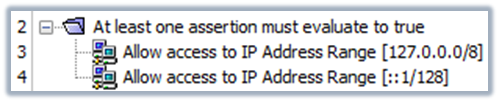
The Gateway in CA CloudMinder 1.5x uses some of the storage and validation endpoints that are affected by the vulnerability of lacking TLS certificate validation. Because the endpoints in question only need to be accessible by the Gateway itself, you can mitigate the vulnerability by only allowing local access.
Perform the following steps for each tenant:
<?xml version="1.0" encoding="UTF-8"?>
<wsp:Policy xmlns:L7p="http://www.layer7tech.com/ws/policy" xmlns:wsp="http://schemas.xmlsoap.org/ws/2002/12/policy">
    <wsp:All wsp:Usage="Required">
        <wsp:OneOrMore wsp:Usage="Required">
            <L7p:RemoteIpAddressRange>
                <L7p:NetworkMask intValue="8"/>
                <L7p:StartIp stringValue="127.0.0.0"/>
            </L7p:RemoteIpAddressRange>
            <L7p:RemoteIpAddressRange>
                <L7p:NetworkMask intValue="128"/>
                <L7p:StartIp stringValue="::1"/>
            </L7p:RemoteIpAddressRange>
        </wsp:OneOrMore>
    </wsp:All>
</wsp:Policy>
|
Copyright © 2015 CA Technologies.
All rights reserved.
|
|