

Identity Management reports enable you to see the current state of a Identity Management environment. You can use this information to ensure compliance with internal business policies or external regulations.
You generate Identity Management reports from management data which describes the relationship between objects in Identity Management environment. Examples of management data include the following:
In Identity Management, the reporting setup requires the following three major components:
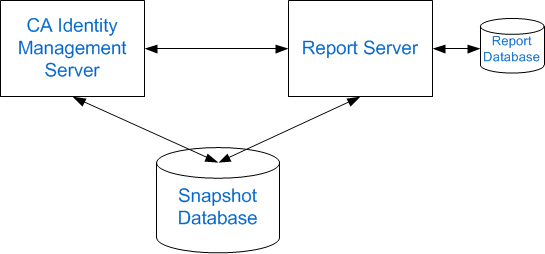
Note: The Snapshot Database in this illustration graphic could also be the Audit Database or Workflow Database.
Also known as CA Business Intelligence, this server generates reports, communicating directly with Identity Management and the Snapshot Database.
The database where the CA Report Server (Business Objects) stores its data.
CA Identity Management Server allows you to export Identity Management object data to the Report Database.
A separate database containing the snapshot data of objects in Identity Management
Important! The Report Server uses Business Objects Enterprise. If you already have a Report Server in your environment and want to use it with Identity Management, the minimum version required by Identity Management is CA Business Intelligence 3.2 SP5.
A snapshot report includes data from the Snapshot Database, which contains information from the Identity Management object store and the user store. An example of a snapshot report is the User Profile report. You define the snapshot data that is added to the Snapshot Database and using snapshot definitions, specify the information to include.
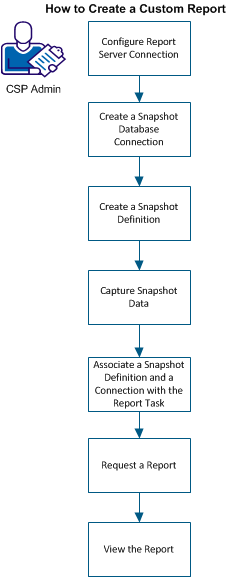
The following graphic illustrates the process for creating a custom report:
|
Copyright © 2015 CA Technologies.
All rights reserved.
|
|