

Installation Guide › Server Installation › Report Server › High Availability Report Server on PostgreSQL › Install the SQL Anywhere Database Server
Install the SQL Anywhere Database Server
Once you have met the prerequisites for the SQL Anywhere database, run the installation program to install the database server.
Follow these steps:
- Start the installation program.
./cabi_installer.sh
Respond to the prompts that appear in the following steps.
- Enter Non-Root Credentials:
- User Name: bobje
- Group Name: bobje
- Accept the default path for the CA Shared Components Directory.
- Respond Yes to these questions:
- Press Enter to invoke the Business Objects Enterprise installer.
- Enter the default installation directory:
/opt/CA/SharedComponents/CommonReporting3/
- Installation Type: select User –Regular SAP Business Objects Enterprise installation
- Select: 2 – Custom or Expand.
Select only the following features to install:
- Under Server Components, select Central Management Server with these options:
- Auditor
- SQL Anywhere
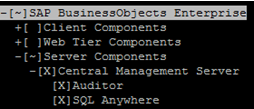
- Under Database Access, select SQL Anywhere
- Enter the following information for new CMS:
- Host name of the local system
- CMS port number, using the default port: 6400
- Administrator password
- Enter information about the SQL Anywhere database:
- Host name
- Port number
- Administrator password
- CMS database name
- Audit database name
- User ID and password for the database user
- Respond to the final questions to complete the installation.
Copyright © 2014 CA Technologies.
All rights reserved.
|
|