

Using CA SYSVIEW Objects › How Security Validation Works
How Security Validation Works
The same user security is applied to the user accessing CA SYSVIEW through the client as they would through any CA SYSVIEW user interface. Users that do not have access to a command as established by CA SYSVIEW internal or external rules, cannot access that command on the client.
Client security validation works as follows:
- The user logs on through the client.
- The user goes through GMI user ID and password validation.
- The user accesses a CA SYSVIEW object.
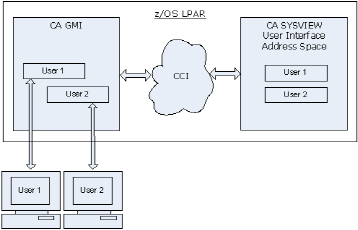
- A user session is established in the CA SYSVIEW User Interface address space.
The following diagram shows the GUI connections and the user tasks:
When a user does not have access to a field, security works as follows:
- Under a SYSVIEW 3270 interface, the field is not displayed.
- Under GMI, instead of displaying the actual data, the GUI displays static data in these columns according to the following data type of the field:
- For character data, blanks display
- For numeric data, zeros display
- For the date, NONE displays
- For the time, 00:00:00 displays
Copyright © 2013 CA.
All rights reserved.
|
|