

CA SSO Agent for SAP Guide › CA SSO Agent for SAP Deployment Examples
CA SSO Agent for SAP Deployment Examples
This section contains the following topics:
Case 1: CA SSO Agent for SAP SSO Mode
Case 2: CA Federation with CA SSO Agent for SAP
Case 3: CA SSO Agent for SAP and CA Federation with CA SSO Connector
Case 1: CA SSO Agent for SAP SSO Mode
Use case 1 is a deployment in which this product protects the resources on the SAP Web AS in SSO mode. A deployed CA SSO system integrates with the CA SSO Agent for SAP, and authenticates users to the SAP Web AS.
The following illustration shows this deployment with Web Agent and this product:
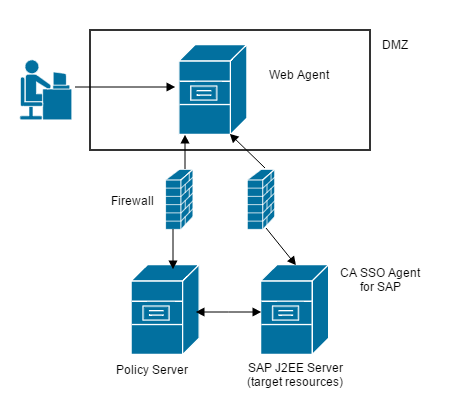
How Use Case 1 Works
The interaction between the components in SSO mode is shown in the following illustration:

This product works according to the following process:
- User (HTTP-based web client) accesses the Web AS J2EE engine application or Enterprise Portal using the front-end web server.
- Web Agent hosted on the web server, intercepts the request, and determines whether the Policy Server is protecting the requested application or resource. If the resource is protected, the user is challenged for authentication.
- Policy Server authenticates the user and checks for the access permissions to the protected application. If the user has access to the application, the Policy server returns the Web AS username in the form of an HTTP header response along with the SessionLinker header response. The SessionLinker response contains the cookie names (MYSAPSSO2 and JSESSIONID) against which the CA SSO session is tracked.
- Once CA SSO allows access to the protected application or resource, the web server forwards the request to the J2EE engine. The J2EE engine invokes the CA SSO login module, protecting the Web AS deployed application or the Enterprise Portal application.
- The CA SSO login module validates the session information against the Policy Server.
- The Policy Server returns success and the Web AS username if the session is valid. The CA SSO login module confirms that the session does indeed belong to the requesting Web AS user. If the session is not valid, the authentication attempt fails. Access to the requested resource is denied.
- If the CA SSO login module successfully validates the user session, the module sets the user Principal to the Web AS username. The Web AS J2EE engine invokes the CreateTicketLoginModule, which creates the MYSAPSSO2 ticket for the authenticated Web AS user. The J2EE engine services the request for the application if both login modules succeed.
- The SessionLinker on the web server tracks the CA SSO session against the MYSAPSSO2 and JSESSIONID cookies of the Web AS session. If access is illegal, the cookies are emptied. If access is legal, the requested application or resource is presented to the user.
Case 2: CA Federation with CA SSO Agent for SAP
CA Federation customers who want to protect resources on an SAP Web AS with this product can use the example in the following illustration:
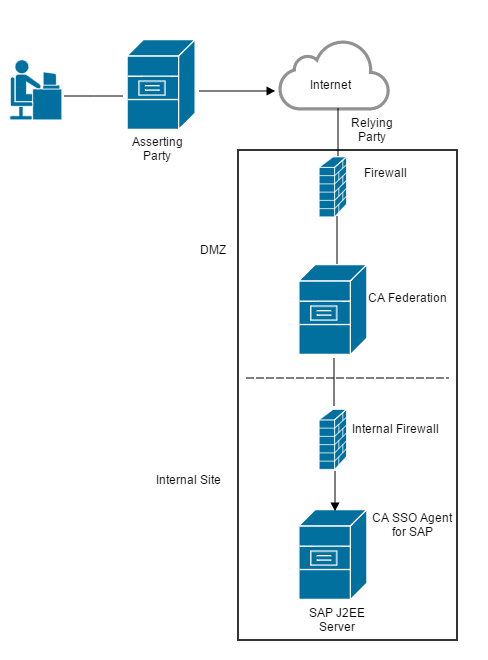
How Use Case 2 Works
Use case 2 for CA Federation and this product implementations assumes the following conditions:
- No Policy Server
- No Web Agent
- This product operating in Federation mode.
The example in use case two works according to the following process:
- The user authenticates to the asserting party.
- The asserting party passes an assertion to CA Federation at the relying party.
- The CA Federation creates a FEDPROFILE cookie.
- The user is redirected to the target resource on the SAP Web AS J2EE server.
- The SAP Web Application server invokes the login module.
- The CA SSO login module (in the login stack of the SAP Web AS) extracts the contents of the FEDPROFILE cookie. The login module authenticates the session of the user to the SAP Web AS based on the User Identity present in the FEDPROFILE cookie.
- The SAP Web AS authorizes the user, and then allows access to the requested resource.
Case 3: CA SSO Agent for SAP and CA Federation with CA SSO Connector
CA Federation with the CA SSO Connector enabled protects the SAP Web AS and requests for federation resources.
A deployed CA SSO system can integrate with CA Federation to allow authentication using CA SSO. This integration is accomplished using the CA SSO Connector, a software component included with CA Federation.
The following illustration shows this deployment with CA SSO, CA Federation, and the SAP Web AS:

Note: Both CA Federation connector and this product must be configured with the same Policy Server.
How Use Case 3 Works
When this product operates in Federation mode, it works with CA Federation to handle requests for federated resources on the SAP Web AS. If CA SSO is protecting the SAP Web AS server, the Policy Server generates and validates the CA SSO session and user identity information. Additionally, CA Federation generates a cookie that contains user attributes that are passed on to the target application on the SAP Web AS.
Use Case 3 includes the following components in the network:
- Policy Server
- Web Agent
- CA Federation with the CA SSO Connector is enabled; it is operating in either standalone or proxy mode
- This product is operating in both SSO mode and federation mode
The communication process is as follows:
- The federated user authenticates at the asserting party, which generates a SAML assertion.
- The asserting party passes the assertion to CA Federation at the relying party.
- CA Federation with the CA SSO connector enabled, contacts the Policy Server, which generates an SMSESSION cookie that includes CA SSO session and identity information. Additionally, CA Federation itself generates a FEDPROFILE cookie that contains user attributes.
- The Web Agent intercepts the request and validates the user using the SMSESSION cookie.
The target URL you configure in CA Federation is a protected resource of the Web Agent.
- The Web Agent forwards the request and the FEDPROFILE cookie to the SAP Web AS.
- The SAP Web Application server invokes the login module, which calls CA SSO Agent for SAP.
- This product extracts the contents of the SMSESSION and FEDPROFILE cookies and asserts the user session and user attributes to the SAP Web AS.
- The SAP Web AS delivers the requested resource to the user.
Note: For enterprise users connecting directly through the CA SSO agent (rather than the asserting party), the communication process is identical to Use Case 1 which is discussed earlier in this chapter.
Copyright © 2015 CA Technologies.
All rights reserved.
|
|