

This section contains the following topics:
Increased Security with Tier 2 Integration
In an effort to meet the requirements of customers and enable more widespread use of applications, many leading ERP vendors, including PeopleSoft, have developed web‑based versions of their applications or web-based front ends for their applications. These web-based front ends provide:
CA SSO lets you create a centrally managed environment, providing a secure, personalized user experience across all web applications. Through published interfaces, CA SSO can authenticate users to PeopleSoft. This integration enables the PeopleSoft web-based infrastructure and applications to coexist with other portals and web applications, while offering the maximum user experience and benefit.
Successful approaches to centrally managed security have typically included the use of a standard Web Agent on a front-end web server and a small piece of PeopleCode that enables PeopleSoft to trust the contents of an HTTP header inserted by CA SSO. Such designs depend upon a level of trust of the front-end web server, a compromise of which could be used to gain elevated access to the system. CA SSO labels these designs Tier 1 because the point of trust is entirely within the first tier—the front-end web server. In environments where the application server and front-end web server are located entirely on a trusted network, where security requirements are low to moderate, this design is adequate.
In Tier 2 implementation, the point of trust moves away from the front-end web server and into a more trusted host—in this case the PeopleSoft application server. In Tier 2 integrations, the application that implements the application logic and security is given the ability to call CA SSO APIs to communicate with a Policy server, to validate the information that is presented from the Web Agent.
Many web-based applications use an independent session management scheme, frequently through the use of a cookie. Therefore, the replay prevention and session management logic of CA SSO may be bypassed. The possibility that the CA SSO and application sessions could lose synchronization with each other is one of the main security problems when integrating applications that maintain their own sessions. Tier 2 integration includes a component to prevent such session synchronization issues. The SessionLinker web server plug-in monitors the CA SSO Session ID header and PeopleSoft session cookies. When the two sessions diverge, action is taken to prevent the application from operating until a new session within PeopleSoft is established. The default action is to destroy the PeopleSoft session, causing PeopleSoft to create a new session with the correct user information.
The following illustration shows a typical environment.
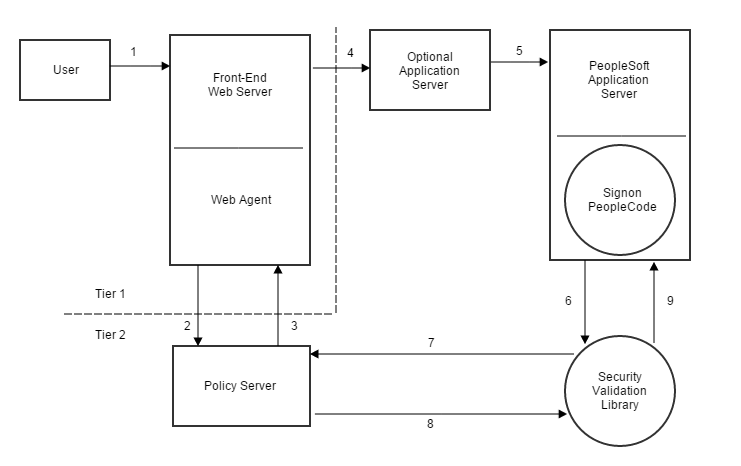
A description of the numbers in the preceding illustration follows:
Note: The DEFAULT_USER account has no access to the system with or without CA SSO's approval; if someone were to obtain and attempt to use that account without CA SSO, no access would be granted and no data would be available.
Because PeopleSoft deployments vary, the preceding illustration may not reflect any particular customer’s actual environment. For example, the Optional Application Server might not be present. However, the diagram is representative of most typical deployments.
|
Copyright © 2015 CA Technologies.
All rights reserved.
|
|