Administering Security › Understanding User Profiles
Understanding User Profiles
Note: This section does not apply to CA SOLVE:FTS, CA SOLVE:Access Session Management, CA SOLVE:InfoMaster, and CA SOLVE:NetMail.
User profiles set user preferences and tailoring options. User profiles work with a user’s UAMS definition to set the user’s working environment.
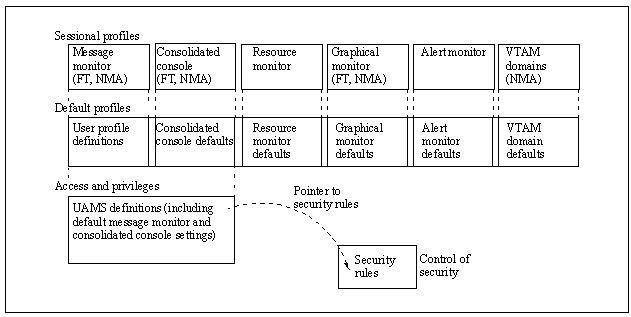
The following illustration shows examples of user access and privilege. Profiles that are specific to a particular product are identified in parentheses.
- At the lowest level, UAMS uses the security rules to control basic functions, security, and logon access to the region. Only a system administrator should have the authority to maintain UAMS definitions.
- At the next level, user profiles contain default settings (which are within any UAMS limitations) for the operational environment. Users can update their own profiles, and the system administrator can update any user profile.
- At the highest level, the specific environments seen by a user are determined by the defaults set in that user’s profile record. A user can, however, change those defaults (within any UAMS or user profile limitations) for the duration of a work session.
|
Copyright © 2012 CA.
All rights reserved.
|
|

