

|
|
|
On entry to the security exit, Register 1 points to a list of ten full words, as shown in this diagram.
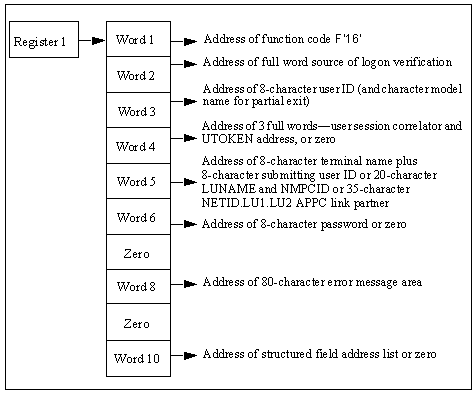
The contents of the parameter list are as follows:
Is a fullword containing the address of function code F‘16’.
Is the address of a subfunction code. This code defines the source of the logon verification call and has values set as follows:
|
Subfunction Code |
Value |
|
F‘0’ |
Call is from an &SECCALL CHECK verb, the LOCK facility, or APPC region validation. |
|
F‘4’ |
Call is from INMC link activation. |
|
F‘8’ |
Call is from APPC link activation. |
Is the address of a 16-character field, blank-padded. The field contains the eight-character user ID whose password and logon capability is to be verified. The ID is followed by the eight-character system default MODLUSER name, or blanks if no model user has been defined.
Is the address of three full words containing the user session correlator and the address of the user token (UTOKEN) of the submitter of the logon verification call, or zero if called from EASINET.
Varies according to subfunction code:
|
Subfunction Code |
Value |
|
F‘0’ |
Address of the eight-character terminal ID, followed by the eight-character user ID of the submitting user. This field can be blank; if so, treat the user ID being checked as the submitting user. |
|
F‘4’ |
Address of the 8-character LU name of the link, followed by the 12-character NMPCID. |
|
F‘8’ |
Address of the 35-character APPC link partners. The format of the link session partners is NETID.LU1.LU2 where NETID.LU1 is the source partner and LU2 is the destination LU of the APPC link. |
Varies according to subfunction code:
|
Subfunction Code |
Value |
|
Subfunction F‘0’ |
Address of the 8-character, blank-padded user ID password. |
|
Subfunction F‘4’ |
Word 6 is set to zero. |
|
Subfunction F‘8’ |
Address of an eight-character area into which the exit can place the session key for this APPC link. |
Is set to zero.
Is the address of an 82-character area into which the exit can place an error message. If an error message is returned, it must be formatted as follows:
Specifies the hexadecimal length of the message text (excluding these two bytes).
Specifies the error message text.
Limits: 80 characters
Message text is converted to uppercase. An error message might be returned in this area for return codes 20 or 24. A message set in this area for any other return code is ignored.
Is set to zero.
If you have a full security exit, this word is set to zero.
If you have a partial security exit this word is set to zero if the user ID is not defined on the UAMS data set. Otherwise word 10 points to a list of full words, ended by a fullword of X‘FFFFFFFF’. Each address in the list points to a single structured field representing one attribute of the user ID to verify. This list therefore provides the exit with access to the entire current definition of this user ID.
The exit must return a completion code in Register 15 on return. Completion codes are supported as described below.
The return codes listed below are for subfunction codes 0 and 4. They are the only codes that are accepted in response to a Logon Verification call. Any other return code is rejected and set to 24.
Indicates that the password is valid. Logon is successful.
Indicates that the password is valid but expired. This is not a new user ID. The user is prompted to change the password before logon is successful.
Indicates that the password is valid but this is a new user ID. The user is prompted to change the password before logon is successful.
Indicates that the password is wrong.
Indicates that the password is correct but logon is rejected. The exit might return an explanatory message in the error message area addressed by word 8 of the parameter list.
Indicates that the request failed or function is not supported by the exit. The exit might return an explanatory message in the error message area addressed by word 8 of the parameter list.
The return codes listed below are for subfunction code 8. They are the only codes that are accepted in response to an APPC link establishment Logon Verification call. Any other return code is rejected and set to 24.
Indicates that link activation is successful. The session key is addressed by word 6 of the parameter list.
Indicates that link activation is successful. No session key is available.
N/A
Indicates that link activation is unsuccessful.
N/A
Indicates that the function is not supported. The link establishment is to continue without a session key.
Notes:
The Logon Verification Call is primarily a means of querying the validity of a password, and the exit can be written to provide only this function. The option of supporting return code 20 is provided to complement support of return code 24 from the Logon Request Call, which allows the exit to refuse a logon request for reasons other than password error.
| Copyright © 2012 CA. All rights reserved. |
|