

|
|
|
If you installed the [set to your product name] or SOA Security Manager SPS federation gateway at a Service Provider site, SOA Security Manager can consume assertions to authenticate users. If the SOA Security Manager consumsites in your federated network that have user stores, you can use SAML 2.0 authentication.
The SAML 2.0 authentication scheme lets a Service Provider in a federated network authenticate a user. It enables cross-domain single sign-on by consuming a SAML assertion from an Identity Provider, identifying a user, and and establishing a SiteMinder session. After a SiteMinder session is established, the Service Provider can authorize the user for specific resources.
The following illustration shows the components for authentication at the Service Provider.
Note: A site may be both an Identity Provider and a Service Provider.
The major components for SAML 2.0 authentication are shown in the following illustration.
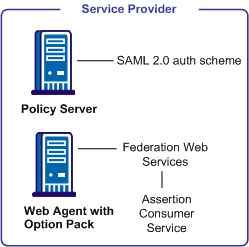
Note: The SPS federation gateway can replace the Web Agent and Web Agent Option Pack to provide the SiteMinder Federation Web Services application functions. For information about installing and configuring the SPS federation gateway, see the CA SiteMinder Secure Proxy Server Administration Guide.
The SAML 2.0 authentication scheme is configured at the Service Provider’s Policy Server, and is invoked by the Assertion Consumer Service. This service is a component of the Federation Web Services application and is installed on the Service Provider’s Web Agent or SPS federation gateway. The Assertion Consumer Service obtains information from the SAML authentication scheme, then uses that information to extract the necessary information from a SAML assertion.
The SAML assertion becomes the user’s credentials to login to the Policy Server at the Service Provider. The user is authenticated and authorized, and if authorization is successful, the user is redirected to the target resource.
Note: The Assertion Consumer Service accepts an AuthnRequest that includes an AssertionConsumerServiceIndex value of 0. All other values for this setting will be denied.
| Copyright © 2011 CA. All rights reserved. | Email CA Technologies about this topic |