

|
|
|
The following illustration shows how the SAML 2.0 authentication scheme processes requests.
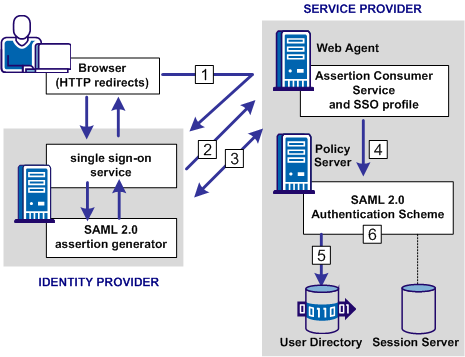
Note: The SPS federation gateway can replace the Web Agent and Web Agent Option Pack to provide the SiteMinder Federation Web Services application functions. For information about installing and configuring the SPS federation gateway, see the CA SiteMinder Secure Proxy Server Administration Guide.
The functional flow for authentication is as follows:
For HTTP-POST binding, the response contains the assertion. For the HTTP-Artifact binding, the response contains a SAML artifact.
If the artifact binding is used, the Assertion Consumer Service sends the artifact to the Identity Provider to obtain a response that contains the assertion. The Assertion Consumer Service sends the response with the assertion as credentials to the Policy Server.
Note: For the POST binding, a signature is required. If a signature is not present, authentication fails. For the Artifact binding, a signed assertion is optional because the assertion is obtained over a secure channel between the Service Provider and Identity Provider.
If single logout is enabled, the SLO servlet redirects the user to a No Access URL.
| Copyright © 2011 CA. All rights reserved. | Email CA Technologies about this topic |