Configuration Guides › Federation Security Services Guide › Federation Security Services Overview › Federation Security Services Process Flow › Flow Diagram for SSO Using SAML 1.x POST Profile Authentication
Flow Diagram for SSO Using SAML 1.x POST Profile Authentication
The following illustration shows the detailed flow between a user and the components deployed at producer and consumer sites. This set-up enables single sign-on between the sites. SAML POST profile is the authentication method and the illustration assumes successful authentication and authorization at the producer and consumer sites.
Note: This flow applies to examples that do not use the SAML Affiliate Agent.
The process flow diagram for SAML 1.x POST Profile follows.
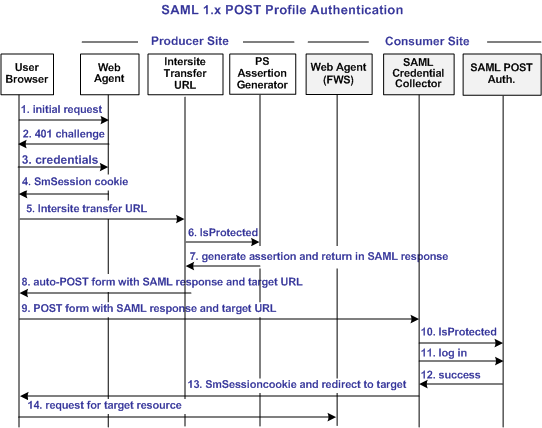
Note: The SPS federation gateway can replace the Web Agent and Web Agent Option Pack to provide the SiteMinder Federation Web Services application functions. In the flow diagram, the Web Agent block would be the embedded Web Agent in the SPS federation gateway. For information about installing and configuring the SPS federation gateway, see the CA SiteMinder Secure Proxy Server Administration Guide.
The sequence of events is as follows:
- User requests a local page at the producer, which is protected by the Web Agent.
- The Web Agent at the producer asks for user credentials.
This flow diagram assumes that the resource is protected with basic authentication and that username and password are the required credentials.
- The user submits credentials.
- The Agent at the producer issues an SMSESSION cookie for the producer site domain and allows access to the local page.
- The user clicks a link at the local page of the producer to visit the consumer. The link looks like it goes to the consumer site but it actually goes to the intersite transfer URL, which contains the affiliate name, the assertion consumer URL, and the target resource as query parameters.
- The Intersite Transfer Service makes an IsProtected call to the Policy Server for the resource. The URL contains the name query parameter that uniquely identifies the consumer.
- The Policy Server recognizes the request as a request for a SAML assertion. The Policy Server generates the assertion and returns it in a digitally signed SAML response message. The Policy Server then returns the response to the intersite transfer URL.
- The intersite transfer URL service generates an auto-POST form containing the encoded SAML response and the target URL as form variables and sends the form to the browser of the user.
- The browser of the user automatically posts the HTML form to the SAML Credential Collector at the consumer site. This URL was read from the SAML response message sent by the intersite transfer URL service.
- The Credential Collector makes an isProtected call to the SAML POST profile authentication scheme. The authentication scheme informs the assertion consumer what type of credentials are required.
- The Credential collector makes a login call for the requested target resource to the SAML POST profile authentication scheme, passing the assertion as credentials.
- If the login succeeds, the SAML Credential Collector generates an SMSESSION cookie for the consumer site domain.
- The SMSESSION cookie is placed in the browser and redirects the user to the target resource.
- The browser requests the target resource, which is protected by the consumer site Web Agent. The browser has an SMSESSION cookie for the consumer domain so the Web Agent does not challenge the user.

