

To ensure integrity and confidentiality of the data being exchanged during a session, WebFort supports Secure Socket Layer (SSL) communication between Web services and WebFort Server. By default, the communication mode between all the components is through Transmission Control Protocol (TCP).
The following figure shows the communication that are supported between WebFort components:
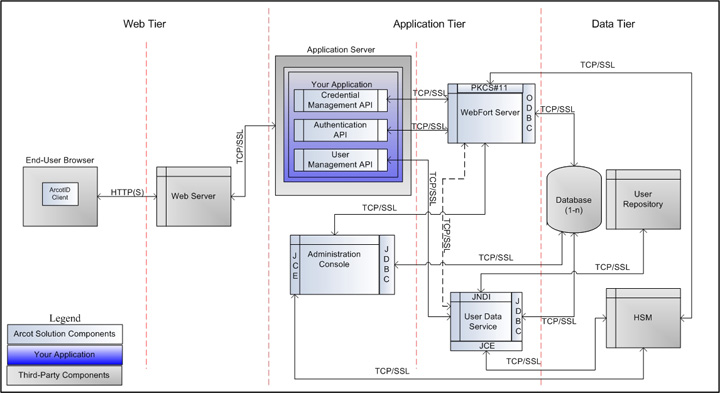
Important! Before you enable SSL communication between Web services and WebFort Server, you must obtain a digital certificate from a trusted Certificate Authority and expose your application over an HTTPS-enabled server port.
To set up one-way SSL between Web services (Authentication and Issuance) and WebFort Server, you must first configure the Transaction Web Services protocol by using the Protocol Management page of Administration Console.
In case of two-way SSL, you must create the client store using the Trusted Certificates Authorities page, configure the client store using the Protocol Management (Transaction Web Services) page, and configure the client certificates using the WebFort Connectivity (Transaction Web Services) page of Administration Console.
The following subsections walk you through the detailed steps for configuring:
Note: In this communication, your application integrated with Web services is the client and WebFort Server is the server.
|
Copyright © 2013 CA.
All rights reserved.
|
|