

The Operations page is a dashboard that provides an overview of the automation objects in the CA Process Automation application. The Operations page lets you view, manage, start, and run instances of the automation objects in the product. The following illustration shows the Process Instances link in the Links palette.
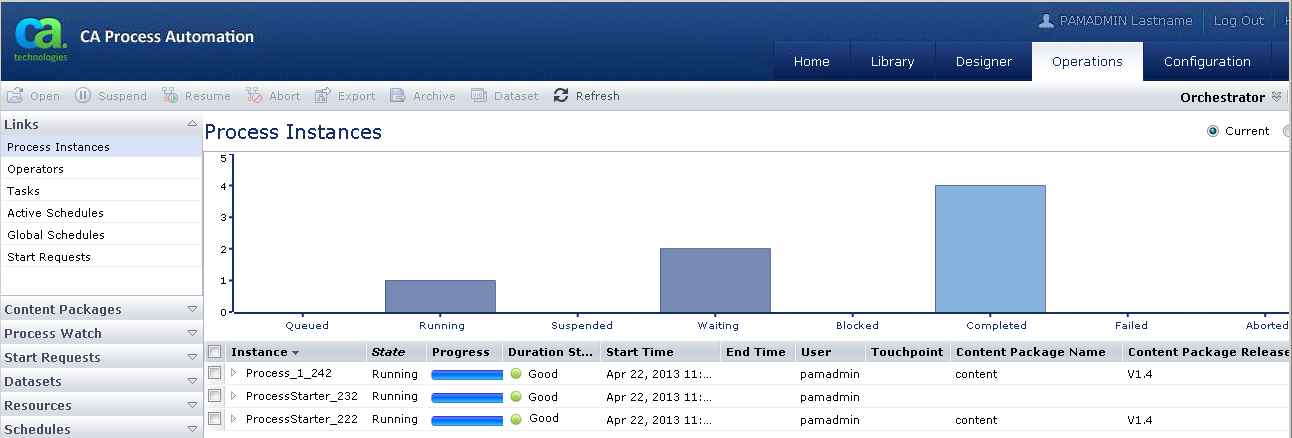
The Operations tab includes the following palettes where you can view and manage automation object instances available in automation library folders:
The Links palette provides links to the following elements where you can view and manage the automation object instances that are running on the Orchestrator:
The right pane in the Operations page lists the running instances and shows a graphical view of them. In the chart view, each bar represents instances in a specific state. To display instances in a specific state, click the associated bar. To remove the filter, click the same bar again. You can filter according to which instances are available in the pane.
|
Copyright © 2014 CA.
All rights reserved.
|
|