

Handling Operators Recovery › Example: Manual Operator Recovery
Example: Manual Operator Recovery
The following example scenario is built on these assumptions:
- Operators were running on a host mapped to the Touchpoint, TP_ainmo01_w500.
- This host became inactive and then became active again.
- The Touchpoint, TP_ainmo01_w500, is not set to run operator recovery automatically.
- The Environment contains the following three Orchestrators:
- Orchestrator
- OrchestratorD610b
- Orchestrator2
Consider the following procedure and their outcome:
- Click Configuration tab in the CA Process Automation web interface.
- Open the Configuration Browser, and expand the All Touchpoints node.
- Right-click the Touchpoint, TP_ainmo01_w500, and select Recover Operators.
Messages appear from each Orchestrator:
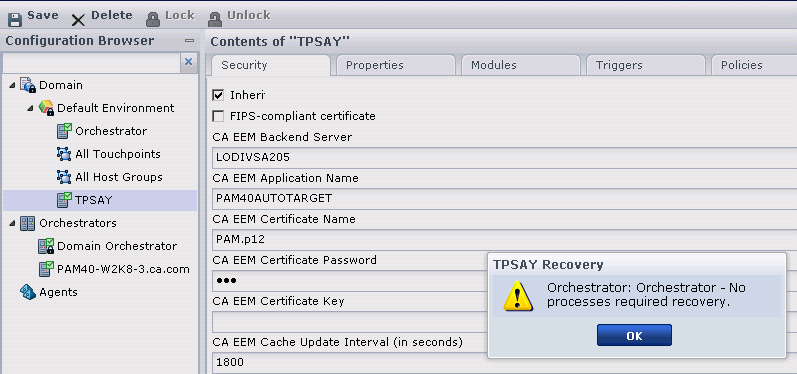
- Interpret these messages as follows:
- Orchestrator: Orchestrator - Queued recovery of Processes with ROID: 2846, 2603
-
Orchestrator: CA Process Automation found two process instances with ROID 2846 and 2803 to recover for TP_ainmo01-w500. Operator recovery does not run right away. CA Process Automation briefly queues the Processes. If the Process instance completes or aborts due to modification by a user while queued, Operator recovery ignores the Process instance.
- Orchestrator: OrchestratorD610b - No Process required recovery
-
OrchestratorD610b: CA Process Automation did not find any process to recover for TP_ainmo01-w500.
- Orchestrator: Orchestrator2 - Unable to communicate with the server. The server may be unavailable or the connection may have timed out.
-
Orchestrator2: This Orchestrator is currently not running as stated in the error message.
- Open the Library Browser and locate the process Inactive TpRecovery_2846. This Process has ROID: 2846. The green Operators indicate that the process finished executing successfully after the recovery.
- View the Logs panel of the Process instance 2846. The log displays when the recovery was triggered and by whom it was triggered.
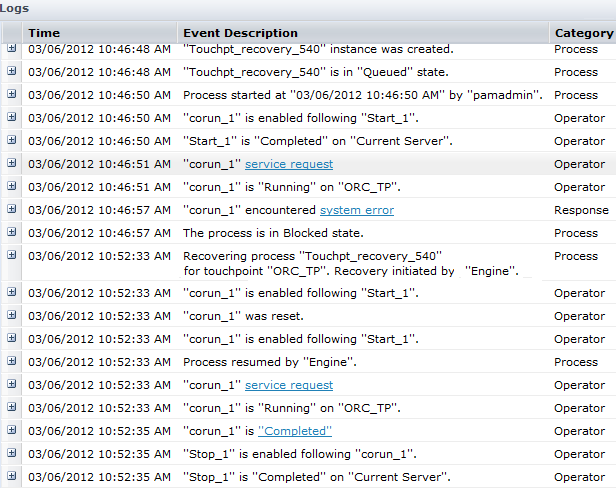
The log shows that operator recovery reset the Operators with System_Error and resumed the process execution.
Note: Automated Operator recovery produces a log message similar to the one highlighted in the previous example, except it says (Initiated by 'Engine').
Copyright © 2014 CA.
All rights reserved.
|
|