

When you view instances of processes with any filter in Process Instances pane, you can take a selected action on multiple instances simultaneously. When you select instances in different states, actions that apply to the state of at least one of the selected instances are displayed for selection. Consider the following example:
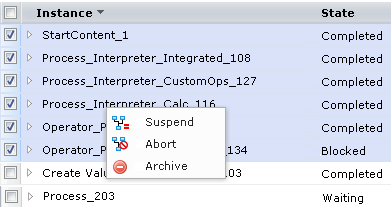
When you select the process instances in the Completed, Blocked, and Waiting states, the right-click menu displays the following actions:
Refresh is available in all multiselect cases. The actions that are displayed are based on applicability to at least one of the states; for example:
If you select Suspend in this example, the objects currently in Blocked and Waiting states would change to the Suspended state. The object in Completed state would be unaffected.
Consider the case where you are denied permission to run the Abort command for a process instance such as process_1514.
Export instance definition is the exception to the multiselect rule. This action is available only when you select a single row.
Use standard Windows multiselect procedures to select such rows in a block or select multiple rows individually. Most multiselect options are available in the Process Instances pane. Client.
Select multiple instances in the detail pane of process Instances and then right-click and select one of the available commands.
Aborts the selected Process instances that are in one or more of the following states:
Archives the selected Process instances that are in one or more of the following states:
Suspends execution of the selected process instances that are in one or more of the following states:
|
Copyright © 2014 CA.
All rights reserved.
|
|