

Introduction to Components of a CA Process Automation System › A Simple CA Process Automation System
A Simple CA Process Automation System
A simple CA Process Automation system includes three components: the Domain Orchestrator, a database server, and CA Embedded Entitlements Manager (CA EEM).
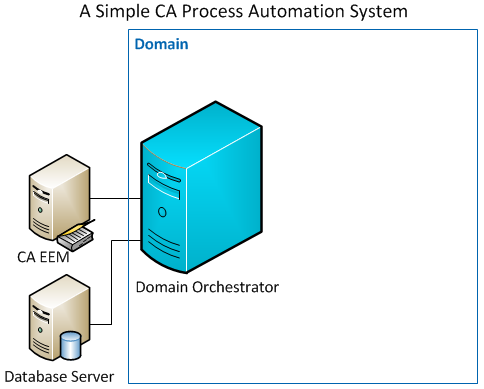
- The Domain Orchestrator
-
Orchestrators are CA Process Automation servers. Users connect to an Orchestrator to design and test processes, execute processes, and configure the CA Process Automation system in various ways. Every CA Process Automation system has a Domain Orchestrator and can also have one or more non-Domain Orchestrators. A simple deployment has a single Domain Orchestrator.
- A Database Server
-
During the installation of the Domain Orchestrator, you identify the database server in which to create the three CA Process Automation databases.
- The Library database stores the automation content that you create. Examples include processes, datasets, and forms.
- The Runtime database stores state information about process instances that have been executed or are in the process of being executed.
- The Reporting database stores information about process instances that have been executed in a format suitable for running reports against.
- CA Embedded Entitlements Manager (CA EEM)
-
- During the installation of the Domain Orchestrator, you register the CA Process Automation application with CA EEM. A single CA EEM instance can be used with multiple CA Technologies products to provide a single place to manage user identities and their application permissions.
- CA EEM authenticates CA Process Automation users. CA EEM attempts to match credentials that users enter at login with credentials of known CA Process Automation users. All valid credentials are either defined directly in CA EEM, or, more commonly, are referenced by CA EEM from one or more LDAP-based repositories such as Microsoft Active Directory.
- CA EEM also manages the authorization levels for CA Process Automation users. Within CA EEM, you assign permissions to each user account after CA Process Automation is installed to provide that user with relevant permissions inside the CA Process Automation application.
Copyright © 2014 CA.
All rights reserved.
|
|