

Install the Domain Orchestrator › Prerequisites to Installing the Domain Orchestrator › CA EEM Prerequisites › Gather CA EEM Related Information for the Domain Orchestrator Installation
Gather CA EEM Related Information for the Domain Orchestrator Installation
Before you begin the installation of the Domain Orchestrator, have at hand the following details of your CA EEM configuration:
- The CA EEM administrator credentials, where EiamAdmin is the user name.
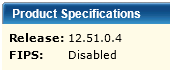
- The CA EEM release version and the FIPS setting in CA EEM.
- Browse to the CA EEM you are using.
https://server:5250/spin/eiam
- Select the CA Process Automation application name from the Application drop-down list.
- Enter valid login credentials, for example, EiamAdmin and the associated password. Click Login.
- Click About. The CA EEM release version and the FIPS setting appear under Product Specifications.
Note: During the CA Process Automation installation, the process that registers the CA Process Automation application with CA EEM also generates the certificates that CA Process Automation uses to connect to CA EEM.
- If CA EEM is FIPS-enabled, then the PAM.cer and PAM.key are both generated.
- If CA EEM is FIPS-disabled, then you provide a password (the EEM Certificate password) before registering the CA Process Automation application in with CA EEM. This password is then used to protect the PAM.p12 certificate that gets generated when registering the CA Process Automation application with CA EEM.
- If you install without registering the CA Process Automation application with CA EEM, you are prompted to select the SDK corresponding to your CA EEM server version.
- The host name of the CA EEM server. To determine the host name, log in to CA EEM. The host name is displayed with the label, Backend, in the title bar.
Important! You need the EiamAdmin password to log in to CA EEM.
- If you are upgrading and plan to configure CA EEM to use multiple Microsoft Active Directories, know the name of the AD domain that you currently reference. Consider specifying this domain as the default AD domain. CA Process Automation users belonging to the default AD domain can log in to CA Process Automation with their unqualified user name after you reassign them to an application group.
- Record the certificate password that you plan to enter. This certificate password controls access to the keys that encrypt passwords and other critical data. The certificate password is specific to a single CA Process Automation Domain. (This certificate password is not CA EEM-related, but it is important to record it.)
Important! You must use this same password when you install any other Orchestrator or when you add cluster nodes to an Orchestrator. This same password is a required entry when you upgrade CA Process Automation.
Copyright © 2014 CA.
All rights reserved.
|
|