

The Calendar Designer opens when you edit a Calendar object. Use the Basic tab to define rules that generate included dates. You can then exclude certain dates. Another approach is to create a calendar specifically for excluded dates that you want to apply and manage separately.
|
Item: |
Description: |
|---|---|
|
|
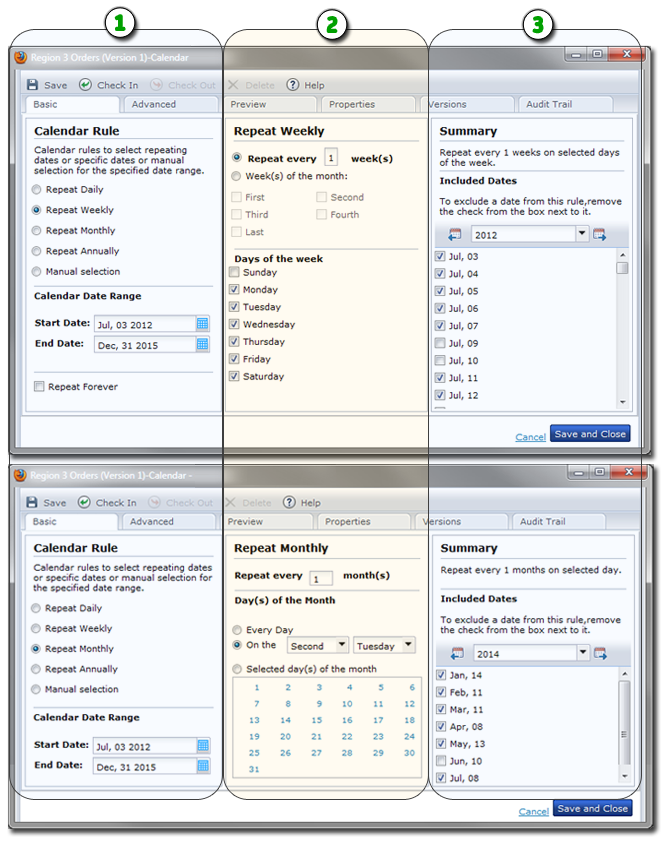
Calendar Rule Recurrence: Select an option representing the recurrence pattern for the calendar dates that you want to define. Options include Daily, Weekly, Monthly, Annually, or your own manually selected dates. You can also define a date range or set the rule to repeat indefinitely. |
|
|
Detailed Settings: This portion of the Basic tab bases its appearance on your Calendar Rule selection. For example, a weekly recurrence results in detailed settings for the days of the week and weeks of the month. As another example, a monthly recurrence shows settings for specific days of the month. |
|
|
Summary of Included and Excluded Dates: This area lists all the days in your calendar rule. Clear the check box from a date to exclude it from the calendar. |
|
Copyright © 2014 CA.
All rights reserved.
|
|


