

Schedule objects configure when process or operator tasks run. Specify valid days in the schedule or by reference to previously defined Calendar objects. Schedule objects let you group, coordinate, and schedule when tasks run relative to organizational or architectural elements of an enterprise. For example:
Schedule objects specify:
You can create a schedule with or without specifying a calendar. Processes and other tasks that run every day or on specified days do not require a calendar object. To schedule dates using calendar rules:
Calendars define rules that specify valid dates for performing tasks and closed days on which the tasks cannot run. Schedule objects associate operationally-related tasks with a calendar and specify the times when the tasks run on the valid days the calendar rules define.
|
Item: |
Description: |
|---|---|
|
|
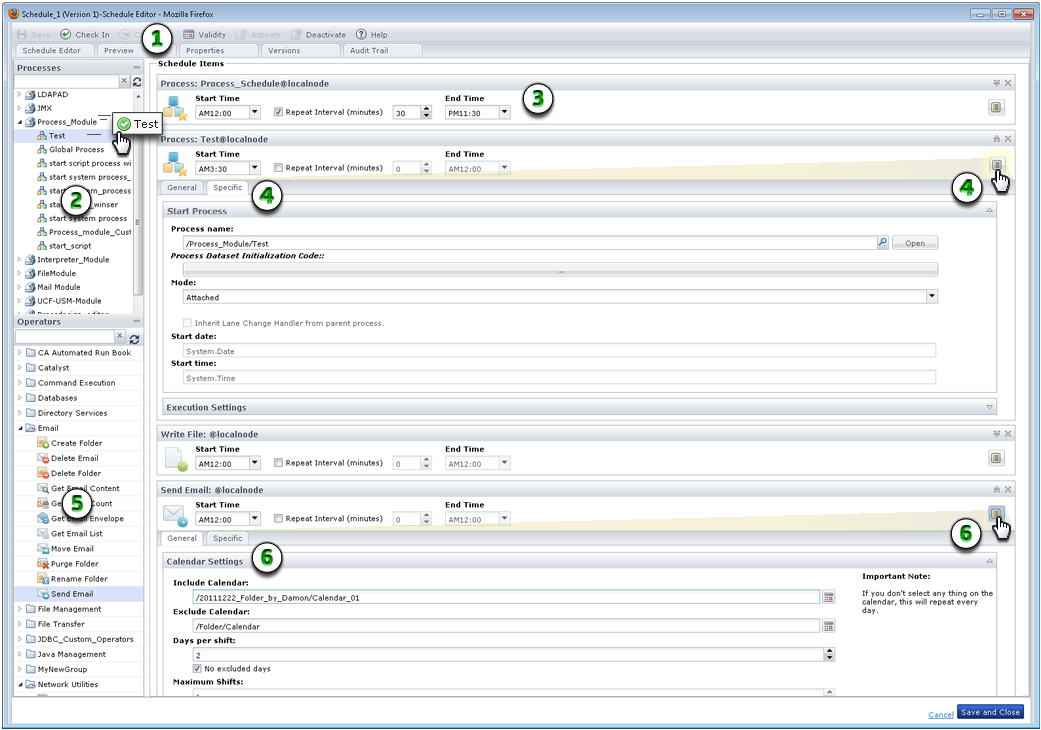
Schedule Editor: When you open a schedule from the Library Browser, the Schedule dialog appears. Use the toolbar to activate, set validity, check in, or save the schedule. Click any of the tabs. |
|
|
Processes Pane: Select the processes to include and drag them to the Schedule Items list. |
|
|
Scheduled Process: Set the duration and frequency for running the process in a single day from 12:00 a.m. to 11:45 p.m. |
|
|
Process Properties: Click Properties to view process properties on the General and Specific tabs. |
|
|
Operators Pane: Select the operators to include and drag them to the Schedule Items list. |
|
|
Operator Properties: Click Properties to view operator properties on the General and Specific tabs. |
|
Copyright © 2014 CA.
All rights reserved.
|
|


