

In this example, you are developing a form for a company that operates in three primary regions (California, Pennsylvania, and North Carolina). In each state, the company has a primary and secondary office location that the name of the city identifies. The stakeholders responsible for implementing company policy want the form to meet the following business requirements:
Example: A Basic Form
Follow these steps:
The Interaction Request Form dialog, or Forms Designer, appears.
Two Select fields appear under your Location page layout.
The Script dialog opens.
{
 selectRegion: function()
  {
	var selectedState = ca_pam_getSelectedOptionValues('Form.State')[0];

	if(selectedState == 'North Carolina')
	 {
	  ca_pam_selectOption('Form.City', 'Raleigh', 'Raleigh', true);
	 }
	else if(selectedState == 'California')
	 {
	  ca_pam_selectOption('Form.City', 'Anaheim', 'Anaheim', true);
	 }
	else if(selectedState == 'Pennsylvania')
	 {
	  ca_pam_selectOption('Form.City', 'Philadelphia', 'Philadelphia', true);
	 }
	else
	 {
	  ca_pam_selectOption('Form.City', 'Pittsburgh', 'Pittsburgh', true);
	 }
  }
}
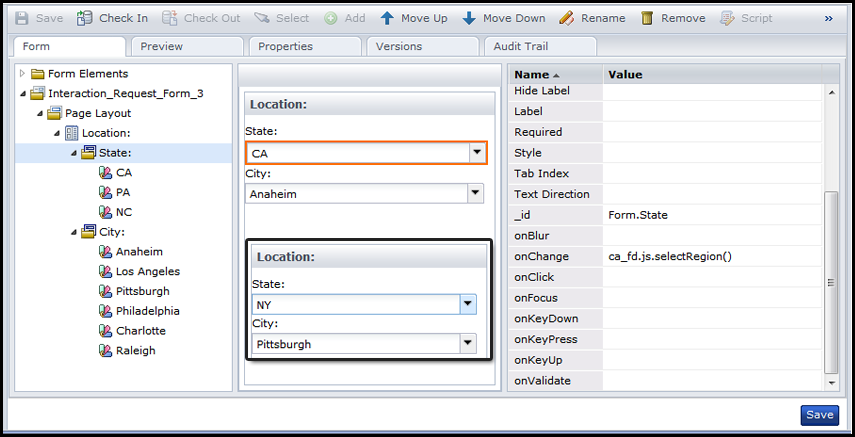
|
State: |
Default City: |
|---|---|
|
CA |
Anaheim |
|
PA |
Philadelphia |
|
NC |
Raleigh |
|
Any other state. For example, NY. |
Pittsburgh |
|
Copyright © 2014 CA.
All rights reserved.
|
|