

You can also loop a series of operators inside a Loop operator.
Follow these steps:
The bounding box color changes to indicate it is the selected destination for operators you drag.
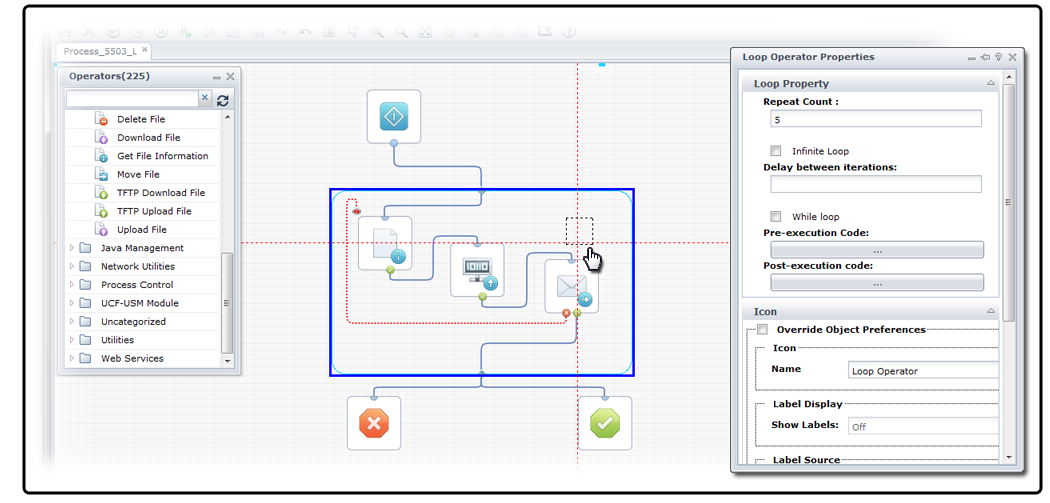
The Properties palette for the Loop operator appears. If it does not appear, choose Properties from the View menu.
Note: You can create an infinitely looping branch by selecting the Infinite Loop check box. As with any infinitely looping operator, you can stop the loop by adding a Stop link from another operator.
Note: Values for the CurrentLoopIteration and OverallLoopDuration system variables are updated for each process instance and appear in the dataset. Even if the Repeat Count for the Loop operator is set to 1, CurrentLoopIteration shows 1 and OverallLoopDuration shows 10 at the end of a single instance. By contrast, the CurrentLoopIteration and OverallLoopDuration system variables are only updated for other operators when Repeat Count is greater than 1. This is because the Loop operator always loops, even if it is only one time.
|
Copyright © 2014 CA.
All rights reserved.
|
|