

Calendars, Schedules, Tasks, and Triggers › Administer Triggers › How File and Mail Triggers Work
How File and Mail Triggers Work
This topic provides a description of the processing sequence for triggers. It uses file and mail triggers as examples.
File and Mail Trigger Example:
- At the configured frequency, CA Process Automation searches for new content in the configured folder and the configured email account.
- If a new file object or mail object is found, CA Process Automation attempts to run the process, based on the XML content.
An illustration of valid XML content for the file trigger follows:
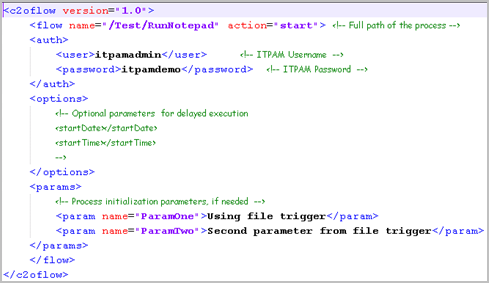
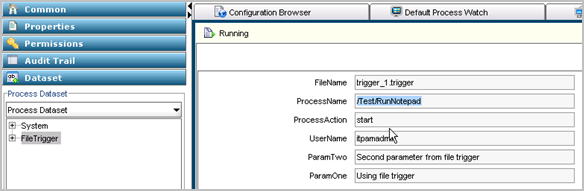
- When the trigger executes the process specified in the trigger instance, the process dataset is populated with the values contained in the XML. The following example demonstrates how the values in the XML content are used to populate the file trigger process dataset.
- The results are posted to the processed folder in the configured path.

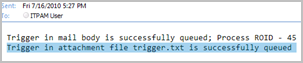
- Emails received at the configured email account are processed in much the same way as XML content received in files. In addition confirmation emails are sent, where the content states whether the XML content was found in the body of the email or in an attachment. The following example shows both messages:
Copyright © 2014 CA.
All rights reserved.
|
|