

The Assign User Task operator displays a CA Process Automation interaction request form to prompt a user and waits for input. The last page of an interaction request form dialog prompts the user to approve or reject the interaction request form. You can specify a time-out or can wait indefinitely. The user input values are saved to variables in the Assign User Task operator dataset.
You can also use the Assign User Task operator to notify a user to respond to a specific task through an embedded URL.
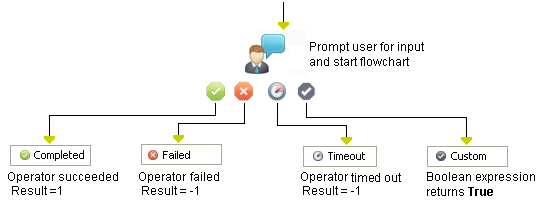
The Assign User Task operator has four standard (noncustomized) exit links:
Processed when a user does the following things:
The parameter values are assigned to operator dataset variables. The Result variable is set to “1” and the Reason variable is set to “COMPLETED.” The task displays in the Task List on the Operations tab with a state of "Completed."
Processed when:
The Result variable is set to "-1" and the Reason variable is set to CANCELED. In each case, the task displays in the Task List on the Operations tab with a state of "Canceled."
Processed if the user does not complete the interaction request form within an optionally specified time-out interval. Any parameter values are assigned to operator dataset variables. The Result variable is set to “-1” and the Reason variable is set to “TIMEOUT.” The task displays in the Task List on the Operations tab with a state of "Timeout."
Processed if the user selects Reject at the user prompt (in the Form Disposition field). The Result variable is set to “_” and the Reason variable is set to “REJECTED.” The task displays in the Task List on the Operations tab with a state of "Rejected."
|
Copyright © 2014 CA.
All rights reserved.
|
|