

The getValueFromValueMapArray returns one field or column from an array that is based on the provided parameters.
Syntax
getValueFromValueMapArray(groupName, arrName, fieldName, fieldValue, requiredFieldName)
Arguments
Defines the name of the Custom Group that you publish.
Defines the name of a C2OValueMap array.
Defines the name of the field for which to retrieve the values of other columns or fields in an array.
Defines the actual value of the field for which you retrieve the values of other columns or fields in an array.
Defines the name of the field or column that you require. For example, username, password, or URL.
Return Value
The return value is a C2OValue Return Type.
Example
Consider a group named DemoGroup and an array as the following illustration shows:
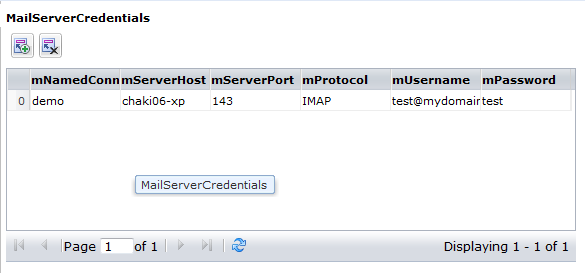
The following syntax retrieves the value of the mUsername field from the array for the named connection DemoGroup:
getValueFromValueMapArray("DemoGroup", "MailServerCredentials", "mNamedConnection", "demo", "mUsername")
The output is a C2OValue where:
|
Copyright © 2014 CA.
All rights reserved.
|
|