

Command Execution › Run SSH Script Operator › Example
Example
The following procedure is an example of how to use the Run SSH Script operator.
Follow these steps::
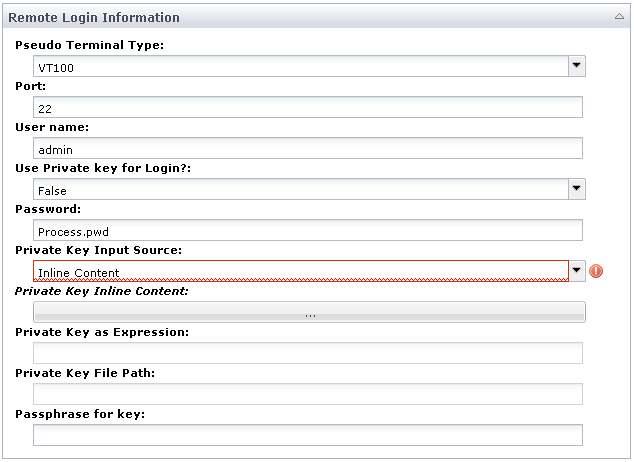
- The Run SSH Script operator reads the login credentials you specify and uses them as follows:
- To connect and authenticate to the remote SSH host.
- To create the "conn" object.
An example of a completed Remote Login Information panel for this operator follows:
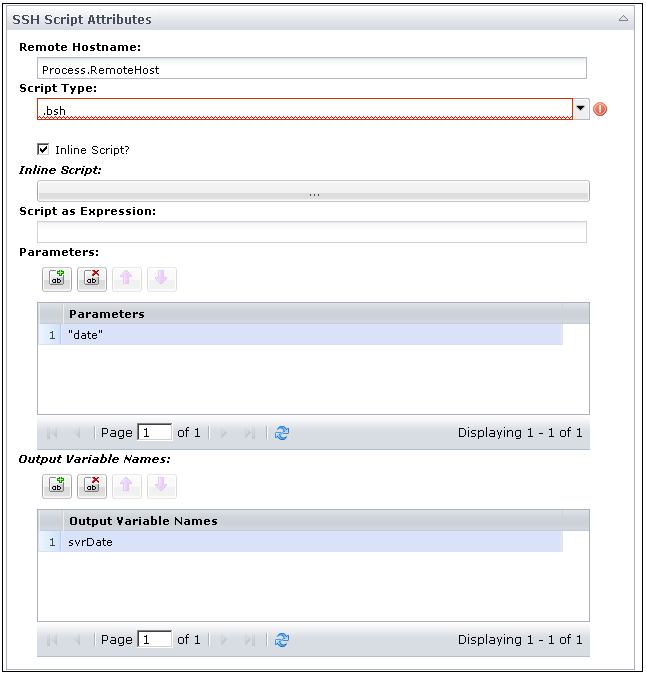
- Complete the Script parameters as follows:
- Specify the remote host name.
- Specify the parameters to pass to the script, where the values in this example follow:
A string whose value is the word: "date".
- Specify the name of the output variables that you create in the script (bean shell or javascript), and that you want saved to the operator’s dataset at the end of execution (here, "svrDate").
Note: The creation of dataset variables directly from the script is currently not supported.
- In the inline script, you leverage the "conn" object as shown in the following bean shell script example:
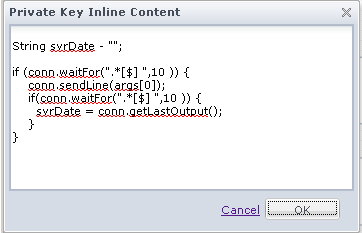
- Create the svrDate variable to be visible at the script scope, so it can be saved to the dataset of the operator at the end of execution.
- Use "conn.waitFor()" to wait for the first prompt “.*[$]” (Reg Ex) up to 10 seconds.
- If the prompt is found within 10 seconds, then use "conn.sendLine()" to send the value of the first parameter passed to the script, followed by a new line character. In this example, the value is: args[0] = the word "date".
- Use "conn.waitFor()" to wait for the next prompt ".*[$]” (Reg Ex) up to 10 seconds.
- If the prompt is found within 10 seconds, use ‘conn.getLastOutput()’ to retrieve the output read during the last call of the method waitFor and store it in svrDate.
At the end of execution, the operator saves the String object svrDate as a CA Process Automation string in the dataset of the operator.
Note: The prompt that was matched appears in the output returned by conn.getLastOutput(). Some SSH servers return this prompt twice in the output, while others return it once.
Copyright © 2014 CA.
All rights reserved.
|
|