

A content designer baselines an object to create a snapshot version of it in the design environment. Users cannot change the baseline version of an object but can use it as the basis for a new version. A content designer can baseline objects at any time, but typically baseline the version of the object that is targeted for export. To prepare for export, content designers can both baseline and set the release version on the export version in the same session.
Note: The version of an object that you baseline for exporting in a folder as a content package can be the current version or another version. Typically, it is the current version that is checked it.
Follow these steps:
In the following example, the Baseline button for Rv2.0 is enabled.
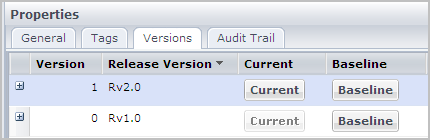
The Versions tab displays information about the release versions that are available for a content package. The release version typically identifies a specific package version to deploy in a production environment.
After you import the content package to the new environment, you can use the Versions tab to set the content package release version attribute.
Follow these steps:
The Library browser shows the current version of the content package.
|
Copyright © 2014 CA.
All rights reserved.
|
|