

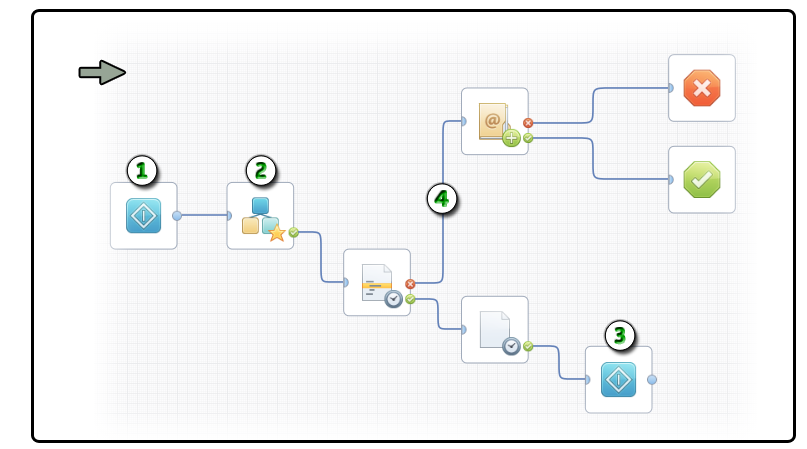
When you want to run a process over and over repeatedly, create a cyclical branch in a process object instead of using the Start Process operator to call a second process repeatedly. A cyclical process runs in an infinite loop. Each iteration does not create new instances of the process object. The primary advantage for implementing a cyclical branch is that the logic that exits the loop is in the process itself. The process does not depend on external factors in a parent process. The process performs as an autonomous object.
Examples of looping processes that run indefinitely include:
Looping Process Example
|
Item: |
Description: |
|---|---|
|
|
Start Operator 1: Begin the process with a standard Start operator. |
|
|
Start Process Operator: Design a sequence of operators that represent the functionality you want to repeat or loop. This branch can even include a Start Process operator to launch instances of a second process. |
|
|
Start Operator 2: The Start operator has an optional entry link. When the process flows to the second Start operator, it reinitializes all other operators and restarts the process back at Start Operator 1. |
|
|
Exit Port and Link: To exit this looping sequence, specify an exit condition. |
Note: An alternate method for interrupting a cyclical process is to use an independent branch with its own Start operator. The branch can wait for the looping portion of the process to change a variable or free a resource. After those events occur, the independent branch runs; for example, by sending an email alert or processing a Stop operator.
|
Copyright © 2014 CA.
All rights reserved.
|
|


