

Designing Processes › Multi-Tenancy and CA Process Automation › Make a Process Aware of Multiple Tenants
Make a Process Aware of Multiple Tenants
Making an existing process aware of multiple tenants involves the following steps:
- Add a security-related variable to the context of a running process instance at run time
- Create a policy for multi-tenancy
Follow these steps:
- To add a security-related variable to the context of a running process instance at run time, do one of the following actions:
- Add a security-related variable to the context of a running process instance at run time using JavaScript:
Process.SECURITY_CONTEXT_ID=<ID>;
   Process.SECURITY_CONTEXT_GRP=[set the product group or family];
For example:
Process.SECURITY_CONTEXT_ID="myid";
   Process.SECURITY_CONTEXT_GRP="mygrp";
- Pass values to the process instance using <params> tags while starting the process through the executeProcess web service. For example:
<executeProcess xmlns="http://www.ca.com/itpam">
   <flow>
   …
   <params>
     <param name="SECURITY_CONTEXT_ID">myid</param>
     <param name="SECURITY_CONTEXT_GRP">mygrp</param>
   </params>
</executeProcess>
- To create a policy for multi-tenancy, complete the following steps:
- Add a policy in EEM using Object as the Resource Class Name.
- Specify the Identities for which this policy is valid.
- Specify Resources so that this policy matches the path of the process for which you are creating the policy.
- Specify the required policy actions.
- Add filters and specify values for the Security Context ID and Security Context Group named attributes.
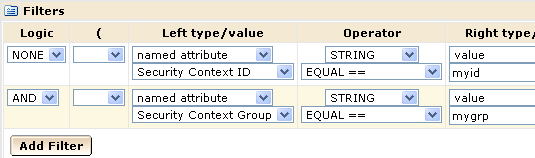
This policy applies to all process instances when the values of the named attributes match the ones in the process instance at run time.
Copyright © 2014 CA.
All rights reserved.
|
|