

Summary
Details
Previously, the Invoke Java operator could be run on Orchestrators. For security reasons, this operator can now be run only on agents. This change prevents the running of custom code that could inadvertently corrupt CA Process Automation components. See Where Operators Can Run in the Content Designer Reference.
For existing processes that include an Invoke Java operator that targets an Orchestrator, change the target so that the operator runs on an agent. If you require the operator to run on the host where the Orchestrator runs, we recommend that you install an agent for this purpose on that same host.
We recommend that you install a dedicated agent on another host and run any Invoke Java operator that is used in new processes on this dedicated agent.
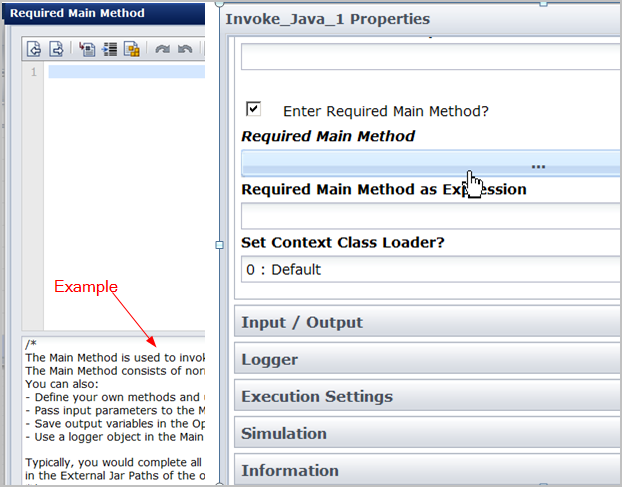
A new example panel has been added inside the Required Main Method text area of the Invoke Java operator. You can display or hide the example with a click of the Hide Examples button. The MyAccount.jar file is required to run the provided java example. The installation or upgrade process adds the MyAccount.jar file to User Resources (located in the invoke_java_op_example_jars folder) in the Domain Orchestrator. CA Process Automation then mirrors the MyAccount.jar file throughout the other nodes in your system. See "Resource for Running Invoke Java Operator Example" in the Content Administrator Guide.
The Use Strict Java Mode? input field is no longer in the Invoke Java operator, but was moved to the Utilities Module properties. The new Invoke Java operators use the value that is configured at the module level. Any Invoke Java operators that you created with CA Process Automation releases before Release 04.2.00 retain this input field. The value of this field dictates whether the operator uses Strict Java Mode.
Other UI changes include:
|
Copyright © 2013 CA.
All rights reserved.
|
|