

To enter a script to initialize Process variables in the child Process, click the Process Dataset Initialization Code browse button to open the Process script dialog. In the Process script dialog, you can enter JavaScript statements to initialize variables in the Dataset of the Process that you are starting.
Refers to the Process Dataset of the new instance being started. This context is the only one in which the Process keyword does not refer to the Process that contains an Operator.
Refers to the Dataset of the parent instance that contains the Run Process Operator. This context is the only one in which the Caller keyword is available.
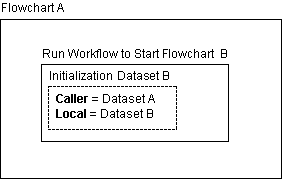
In the Process script dialog, the Process and Caller keywords are mandatory for referring to parent or child Process Dataset variables. If you omit both keywords on a variable name in the Process script dialog, the Interpreter Module looks for a calculation-scope variable. The Interpreter Modules does not look for a similarly named variable in either the parent or child Dataset. For example, the following code fails if no calculation-scope variable X was previously created in the Local script dialog:
Process.X = Caller.X;
Process.Y = X + 100;
|
Copyright © 2013 CA.
All rights reserved.
|
|