

A simple method for looping a process is to set the Loop parameters on an operator that supports looping. Open the Properties palette for the operator. In the Execution Settings section, in the Repeat Count field, enter the number of times for the operator to repeat. Repeat Count is a calculated field, so you can use a variable or expression to specify the count at runtime. Repeat Count accepts either an integer (the number of times to loop) or a Boolean (the loop continues as long as the condition evaluates to true). Examples of valid entries include:
3
Process.var < 3
Process.var == false
You can repeat the operator indefinitely by selecting the Infinite Loop check box.
The  Loop indicator appears on operators that you have decided to loop:
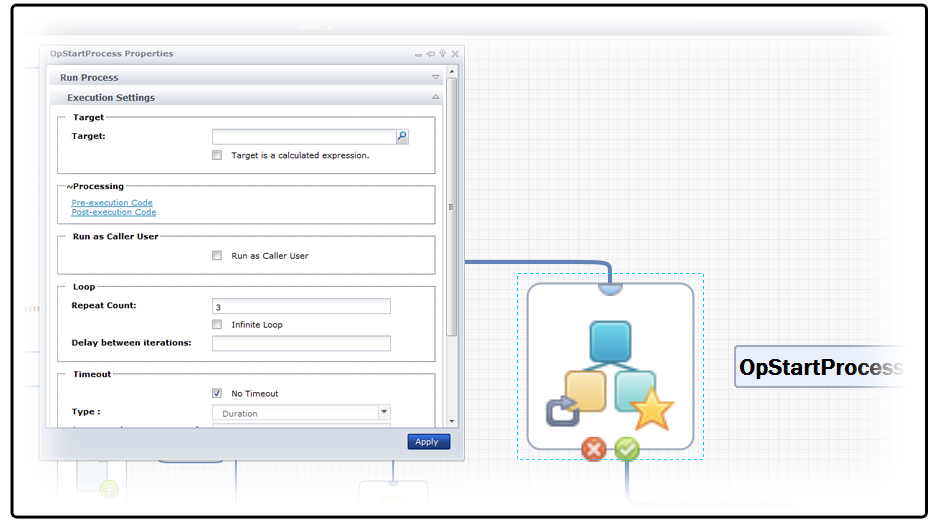
You can configure the loop parameter on the Start Process operator to run a process repeatedly. This works well for looping a few iterations of a process and saving a historical snapshot of the process for each loop. However, avoid calling a process many times (as in an infinite loop) from another process. CA Process Automation keeps a history of all process instances. Calling a process in an infinite loop from another process can use a considerable amount of disk space to save irrelevant data.
The preferred method for running a process repeatedly is to loop cyclically within a process. When necessary, you can still save a historical snapshot of a looping process by branching to a Start Process operator that starts a new detached instance of the process before executing a Stop operator at the end of the branch.
You can specify the retention period, or length of time to save for the history, in the library policy settings for an orchestrator or its associated touchpoint.
Note: If you set an operator to loop with a timeout followed by an action of Reset, the loop condition is checked when moving from one iteration to another, not when resetting an iteration. The OverallLoopDuration variable contains the number of seconds since the start of the first iteration, including time spent in all the reset iterations. Loop iteration resets do not also reset OverallLoopDuration.
If you set an operator to loop with a timeout followed by an action of Continue, OverallLoopDuration will contain the number of seconds from the start of the first iteration until the end of the last successful iteration. If the operator times out, OverallLoopDuration will not contain the number of seconds from the start of the first iteration until the time the operator times out.
|
Copyright © 2013 CA.
All rights reserved.
|
|