

Returns the data of the table from the start index to the end index as provided in the method name. This function returns an array of JavaScript objects where each element in the array represents one row in the table. To retrieve the value for a particular column, you can access the value using column Name property from the JavaScript Object corresponding to the row.
Specifies the unique identifier of a Table form element.
Specifies the numeric index of the first row of the table from which to return data.
Specifies the numeric index of the last row of the table from which to return data. If you specify an index greater than the last available row, the function fails.
Returns an array that is represented as a JavaScript object.
Important! After the method returns the table data, the variable names used to access the columns must be in lowercase, regardless of how you define the Name property for each column field in the Forms Designer.
ca_fd.js.PassData(ca_pam_getTableData('Form.tableRaceResults',0,4))
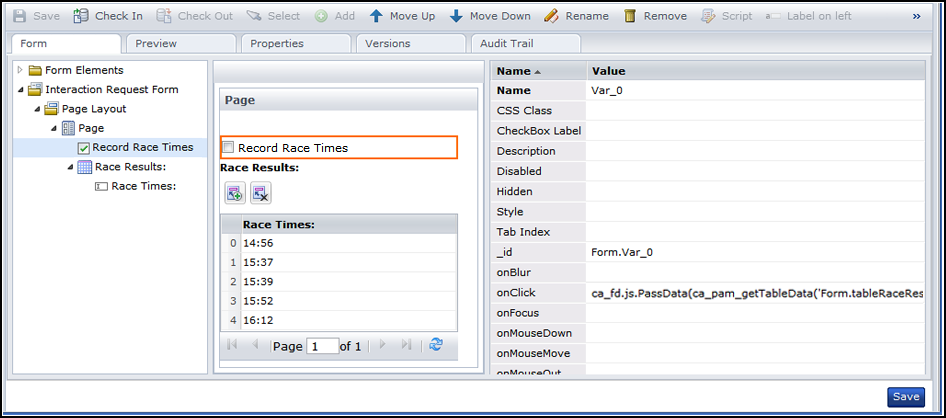
This example uses the following form script to pass the top five finishing times in a race from a Table form element to a custom database. The Record Race Times check box onClick event initiates function calls to get the table data, pass the data, and record the results.
{
 PassData : function(result) {
   for(i=0;i<result.length;i++)
   {
    var firstRow = result[i];
    alert(firstRow.var_0);
   }
 }
}
The following illustration shows the form as it appears at design time.
|
Copyright © 2013 CA.
All rights reserved.
|
|