

Example: SOAP Method
This example uses the CA Process Automation getStartRequestForms web service method to populate a table with all Start Request Forms in the Library . The getStartRequestForms web service method returns all the start request forms to a specified folder.
Note: This method uses the ca_pam_convertXMLToJSObject(xmlString, elementTagName) method (described later in this section) to create a JavaScript object from XML.
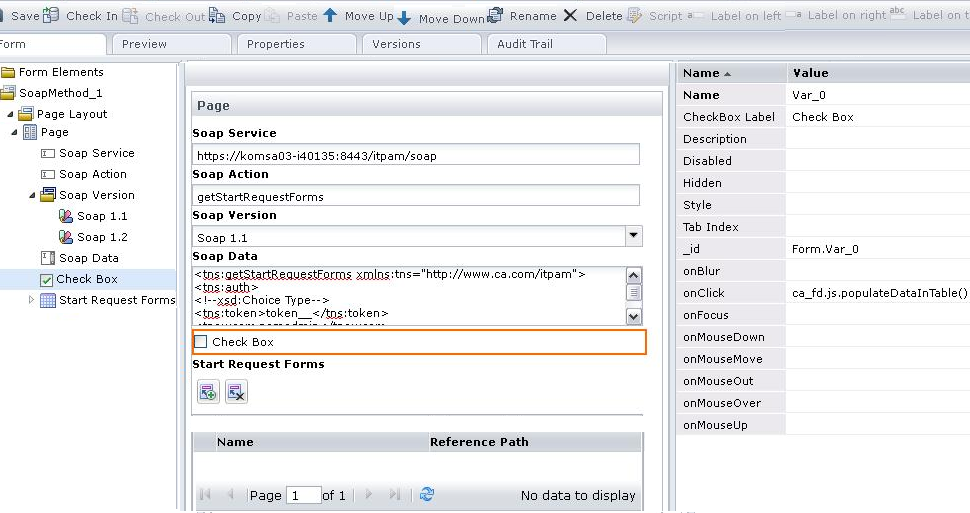
Set this field to the following URL:
http://hostname:portNumber/itpam/soap
Set this field to getStartRequestForms.
Populate this text area with the following code:
<tns:getStartRequestForms xmlns:tns="http://www.ca.com/itpam">
 <tns:auth>
  <!--xsd:Choice Type-->
  <tns:token>token__</tns:token>
  <tns:user>pamadmin</tns:user>
  <tns:password>pamadmin</tns:password>
 </tns:auth>
 <tns:filter>
  <tns:lookUpPath isRecursive="true">/</tns:lookUpPath>
 </tns:filter>
</tns:getStartRequestForms>
Set the onClick attribute of this check box to the ca_fd.js.retreiveSRFAndPopulateTable() value.
{
  retreiveSRFAndPopulateTable: function()
    {
       var callBack = new Object();
       callBack.onSuccess = function(result)
         {
            var srfResult = ca_pam_ convertXMLToJSObject (result,'startRequest');
            var tableArray = new Array();
            for( i=0;i<srfResult .length;i++)
              {
                 var object = new Object();
                 object.name = srfResult [i]["name"];
                 object.refPath = srfResult [i]["refPath"];
                 tableArray[i] = object ;
              }
            ca_pam_clearTableData('Form.srfs',0,ca_pam_getTableRowCount('Form.srfs')-1);
            ca_pam_setTableDataFromJSObject('Form.srfs',tableArray);
         }
       callBack.onFailure = function(caught)
         {
            alert(caught);
         }
       ca_pam_getSOAPData(ca_pam_getTextFieldValue('Form.soapService'),ca_pam_getTextFieldValue('Form.soapAction'),ca_pam_getTextFieldValue('Form.soapData'),'SOAP_1_1',true,callBack);
    }
}
The script runs when the checkbox value is changed. The script populates the srfs table dynamically with the start request forms returned by the SOAP call. The getSOAPData method is used to make a SOAP query to retrieve the data and the convertXMLToJSObject is used to convert the response XML into a JavaScript object. The JavaScript object can then be used to populate the table dynamically by using the ca_pam_setTableDataFromJSObject method.
|
Copyright © 2013 CA.
All rights reserved.
|
|