

|
|
|
There are three things that you can do with the application:
In this chapter, you create a simple function that calls the wizard and property sheet. You start with UIBASIC/UIBasicShell, which has a panel and a caption, but no associated processing.
Next, you modify the panel for your function by adding three buttons to it, which let users open the property sheet and the wizard:
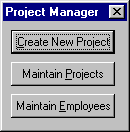
You also specify a recognizable file name for the application, so that when you create an executable file (.EXE), its name makes sense.
To create a top-level interface:
Project Manager is a UIBASIC/UIBasicShell
UIBASIC/UIBasicShell is one of the simplest functions in the CA Plex Pattern Libraries. It has a panel with a caption, and a single event to close the panel. The action diagram has an Events Handler, where you specify how to respond to logical events you define on the panel, but not much processing beyond that.
When you deploy your application, you want your executable file to have a meaningful name. The Project Manager function becomes the executable program. If you do not specify a file name for that function, CA Plex creates an executable with an automatically generated file name, such as AAc4F.exe.
Project Manager file name Projects
Project Manager impl name Projects
Now, when you build your application, CA Plex gives it the name Projects.exe.
| Copyright © 2012 CA. All rights reserved. | Tell Technical Publications how we can improve this information |