

|
|
|
To create a wizard, you inherit from two patterns in the UISTYLE pattern library. You have not used this library directly, yet.
You create the wizard using a parent function that contains a child site, and two child functions that display panels inside the child site.
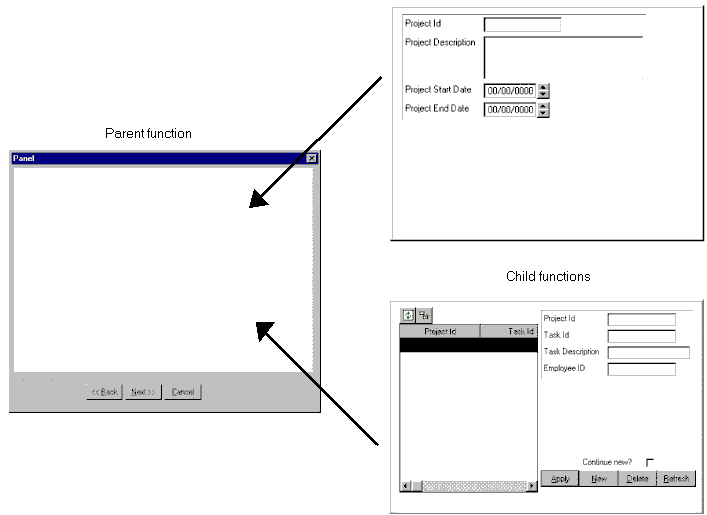
The parent function you create is an unscoped function. This means that it does not appear under either the Project or Task entities, as Project.Edit and
Task.Edit do. To view unscoped functions in the Object Browser, you click the Functions toolbar button.

Wizards are linear. In other words, you run each function in a specific order. You should design the sequence of a wizard before creating its parts. After you determine the order of the parts, you use FNC comprises FNC triples to set up the order. This wizard uses the Edit functions you already have for the Project and Task entities, and uses them as the parts of the wizard.
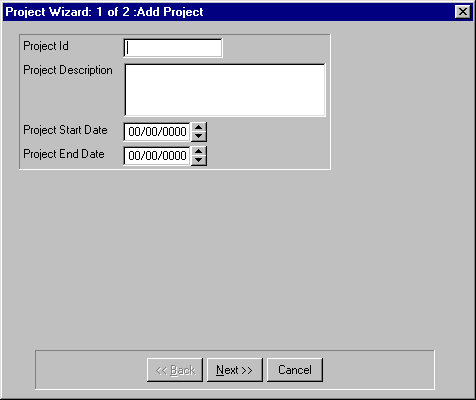
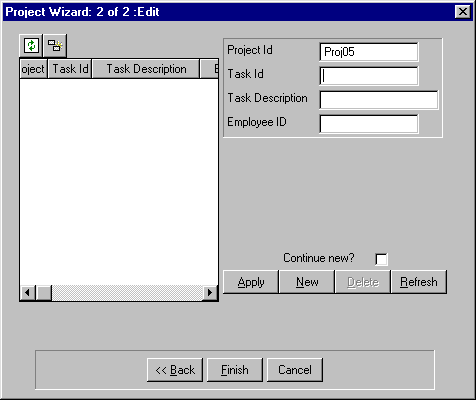
After you define the wizard functions, the user interface looks like this:
To define the wizard functions:
This changes the source object type of the Model Editor to Entity, and shows all of the triples currently defined for the Project entity.
Project function Add Project
Note: Double-clicking a target object in the Model Editor focuses on the object concerned. To reverse the double-click, press the Esc key.
Project.Add Project is a FNC UISTYLE/FrameChild
Project.Add Project is a FNC UISTYLE/EditInsert
Project.Add Project replaces VW UISTYLE/UIStyle.Update
                                 ...by VW Project.Update
Note: Remember to select Function in the Object Browser if you are dragging and dropping.
The Project.Update view can be found by expanding the Project entity in the Object Browser.
When you inherit from FrameChild, the panel scoped to your function becomes a child panel, which you can display in a child site on the parent panel of the wizard.
The UISTYLE/EditInsert pattern provides a dialog that lets you enter a record, which is then validated before insertion in the database.
The previous replaces VW triple specifies which view is used by the Add Project function to display and update records. Note that there are a number of replaces verbs available for functions—make sure you select replaces VW.
Task.Edit is a FNC UISTYLE/FrameChild
Note: To get the Task.Edit function into the source object box, drag it from the Object Browser.
You created the Task.Edit function in the previous chapter, "Modeling Entity Relationships." Adding the is a triple modifies the function so that it can run as part of wizard.
Project Wizard is a FNC UISTYLE/FrameWizard
Project Wizard comprises Project.Add Project
Project Wizard comprises Task.Edit
You just created an unscoped function called Project Wizard.
When you inherit from FrameWizard, you get a panel with Back, Next, and Cancel buttons; a caption; and some code that performs a wizard’s generic functions, such as moving back and forth through the parts.
The comprises triples specify which functions are called by the FrameWizard and appear as the actual parts of wizard.
Note: The sequence of these two triples is important since it determines the sequence in which the parts appear at run time. If necessary, you can change the sequence of triples by dragging and dropping them in the Model Editor.
| Copyright © 2012 CA. All rights reserved. | Tell Technical Publications how we can improve this information |