

You can open the Panel Palette by selecting Panel Palette from the Windows menu. The Panel Palette shows all the elements of the panel, including fields, labels, and buttons which are grouped under folders ( ) and regions (
 ). You can expand the folders and regions to see what they contain. Most of the visible elements are contained in regions. You can see the five regions of the panel (GridP, DetailP, GridButtonP, DetailButtonP, and Panel) in the Panel Palette.
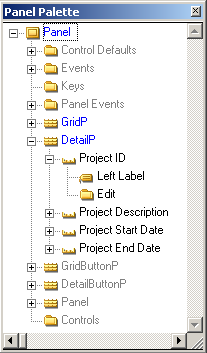
When a region is expanded, as the DetailP region is in this example, you can see the elements contained in that region. In the case of the DetailP region, this includes the Project ID, Project Description, Project Start Date, and Project End Date fields.
When represented on panels, fields typically contain more than one part, usually including at least one label and a control. Notice on the previous graphic that the Project ID field shows a Left Label and an Edit control. The label indicates whether it is a Left Label, a Top Label, or a Right Label. The type of label indicates if it appears to the left or right of the control (left/right label), or as a column heading (top label). The control is the part that the end users interact with. The settings for the control indicate if it is displayed as an edit box, a list box, a combo box, and so on.
|
Copyright © 2014 CA Technologies.
All rights reserved.
|
|