

The Panel Designer lets you change the visual appearance of a panel. It comprises three separate windows: Design window, Panel palette, and property sheet.
To open the Panel Designer
Note: This button is not on the toolbar. It is on the Object Browser. Some buttons are on both the Object Browser and the toolbar.
If you do not see the Project entity, click the Refresh toolbar button.
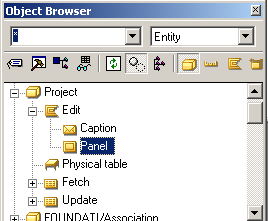
Expand the Project entity, expand the Edit function, and select Panel as shown in the following dialog.
Click the Editor toolbar button.
The Panel Designer appears. You can click the Editor button when you select any object. CA Plex always opens the appropriate editor.
|
Copyright © 2014 CA.
All rights reserved.
|
|