

Choose the Specific Data... menu item from the Select menu to specify data to be analyzed. Performance Manager displays the Performance Manager Data Selection dialog box.
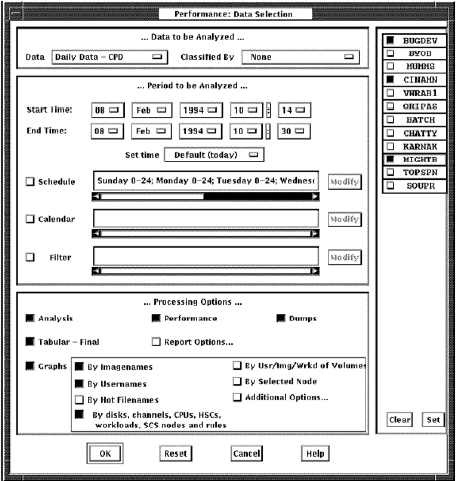
The time period and the processing options selected affect the amount of time needed to complete the analysis and the quantity of memory required (generally restricted by your pagefile quota, PGFLQUO, and the system parameter VIRTUALPAGECNT).
See the Appendix Estimate Virtual Memory Needs for information on estimating virtual memory needs and selecting data.
Including each graphing sub-option expands the memory and CPU requirements. Selecting archived data in place of daily data reduces memory and processing time, but also reduces flexibility. The By Selected Node menu item associated with graphing greatly increases memory requirements, as does the number of x-points.
The Performance Manager Data Selection dialog box lets you perform the following actions:
|
Copyright © 2008 CA.
All rights reserved.
|
|