

To view parameter settings
Performance Manager displays the Parameter Settings dialog box, as shown in the following screen:
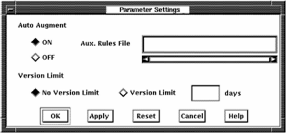
Highlighted buttons indicate the current settings. Your changes in the Parameter Settings box are applied when you click OK or Apply.
Click the ON button to establish automatic augmentation of an auxiliary knowledge base for analysis. The initial setting is OFF.
When auto augment is set on, the dialog box lets you enter the file specification of the compiled auxiliary rules file.
For more information, see the SET AUTO AUGMENT command described in the Performance Agent Administrator Guide.
Enter a decimal number to modify the file version limit on the Performance Manager parameters file and history files. The initial setting is 180.
|
Copyright © 2008 CA.
All rights reserved.
|
|