

You can use the windowing interface even if the Performance Agent is not installed or running on your workstation. The windowing interface can be directed to your workstation by setting host from a workstation to a node on which the Performance Agent is installed and by issuing this command:
$ SET DISPLAY/CREATE/NODE=MYNODE
To start the CA DECwindows Motif interface, enter the following command:
$ ADVISE/INTERFACE=MOTIF
The window interface displays its main window, from which you select the activity you want to perform, as shown in the following main window example:
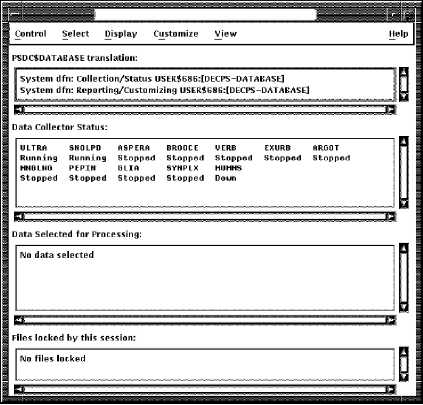
This Main Window for the Performance Agent software allows you to do the following activities:
The Main Window displays the following information:
Displays the following directory information:
If you want to reference CA data stored in a directory other than the system directory, you can specify an alternate directory. This alternate directory might contain CA data files from another cluster, or archived data, or both.
The status of the data collection process can be one of the following:
For more information on Performance Agent status, see the chapter Performance Agent Commands.
Displays the start and end time of the collection period, the processing options chosen, and the nodes selected for analysis. Until you select data, the message “No data selected” is displayed.
Displays one of the following messages:
The Schedule file is locked when you customize the Performance Agent and is unlocked when you complete your changes.
The Parameters file is locked when you customize parameters. When you complete your changes a message box appears asking you if you want to release the file. For more information, see Customizing Parameters in this chapter .
|
Copyright © 2008 CA.
All rights reserved.
|
|