

The privileges required to use the ADVISE COLLECT DISPLAY FILES command are CMKRNL, TMPMBX, and SYSPRV.
The following command invokes the File Activity display:
$ ADVISE COLLECT DISPLAY FILES/qualifiers[,...]
There are two qualifiers used with the command as shown in the following table:
|
Command Qualifier |
Defaults |
|---|---|
|
/DISK=([disk,...] |
/DISK=SYS$SYSDEVICE |
|
/INTERVAL=[seconds] |
/INTERVAL=10 |
Use the /DISK qualifier to specify the names of the disks whose activity you wish to monitor. Select disks that show chronically high I/O rates or response times.
Use the /INTERVAL qualifier to specify the interval at which file activity information is displayed. If no interval is specified, an interval of 10 seconds is assumed.
File activity data is collected at a rate computed as the display rate divided by ten. It is always greater than or equal to one second, and less than or equal to five seconds. Due to the small collection interval, collecting data for a number of disks over a long period may affect overall system performance.
The following command displays active files for disks DUA0 and SYS$DISK: at the default rate of ten seconds.
$ ADVISE COLLECT DISPLAY FILES/DISK=(DUA0,SYS$DISK)
The following example is an example of the File Activity display where files are listed in descending order according to their read/write operation rate:
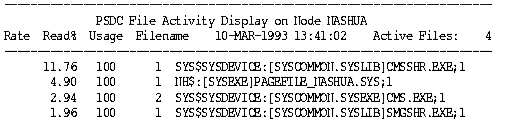
The following table describes fields in the File Activity display:
|
Field |
Description |
|---|---|
|
Rate |
The number of read and write operations per second for the file |
|
Read % |
The percentage of Read I/Os attributed to file reads |
|
Usage |
The number of concurrent references to the file |
|
Name |
The full name of the active file, including its device (which may be a user-defined logical) |
|
Active Files |
The total number of active files on the specified disk(s) with a rate greater than 0 |
If a disk dismounts while the File Activity Display is running, a message displays and collection discontinues for that disk. If the disk is remounted, it must be respecified before its performance statistics are collected and displayed.
|
Copyright © 2008 CA.
All rights reserved.
|
|