

This command displays information about the data collection process.
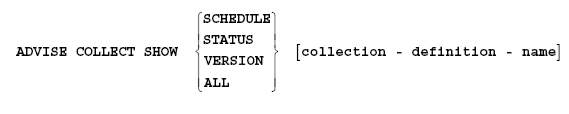
The ADVISE COLLECT SHOW command displays either the schedule file settings, the status of the data collection process and nodes or both, or the version of the Performance Agent component being used.
The following command displays the contents of the schedule file:
$ ADVISE COLLECT SHOW SCHEDULE
When you specify SCHEDULE, the following items are displayed:
The following command displays the current status of the nodes and the Performance Agents on those nodes:
$ ADVISE COLLECT SHOW STATUS PRIMETIME
Each node in the schedule file is listed along with the node's status. The status of the data collection process is one of the following:
The following command displays the version of the Performance Agent component being used.
$ ADVISE COLLECT SHOW VERSION
The following command displays all the information listed by the SCHEDULE, STATUS, and VERSION keywords.
$ ADVISE COLLECT SHOW ALL
The ALL keyword is the default; therefore, specifying ADVISE COLLECT is equivalent to ADVISE COLLECT SHOW ALL.
|
Copyright © 2008 CA.
All rights reserved.
|
|