

This chapter introduces you to Accounting Chargeback and describes:
Accounting Chargeback uses OpenVMS accounting data to produce system use reports. These reports show the charges for various system resources based on unit prices that you provide. You can use Accounting Chargeback report as an itemized bill or as a general resource use report.
With the Accounting Chargeback you can:
The following figure shows how Accounting Chargeback works. It creates reports using your input and system data.
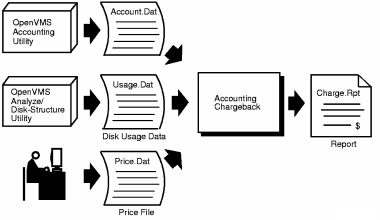
Accounting Chargeback uses information from accounting log files that you specify. The OpenVMS Accounting Utility creates these log files on an individual system or on each node of a cluster. The Accounting Chargeback software can read data directly from open accounting files on different nodes. Although the main accounting log file, SYS$MANAGER:ACCOUNTNG.DAT, is created at system initialization, the OpenVMS Accounting Utility enables you to create other data files.
Before generating a report from the accounting data, you choose the system resources that you want to charge for and specify unit prices for them. You can enter these amounts interactively from the terminal; however, it is usually more convenient to place them in a price file.
To report disk use, enter the command ANALYZE/DISK_STRUCTURE/USAGE to generate a disk use file for each disk on which you want to report. Append the disk use files to one file for the Accounting Chargeback software to process.
The ADVISE CHARGE_BACK REPORT command processes the accounting and disk use data with the price file, which contains resource prices. The software creates a report showing a detailed breakdown of charges by individual job or process, job type, UIC, user name, account name, and grand totals.
To use Accounting Chargeback
This section contains the following topics:
Invoking the ADVISE CHARGE_BACK REPORT Command
Reporting on Disk Use Information
Varying Accounting File Contents
|
Copyright © 2008 CA.
All rights reserved.
|
|