

The <ComponentDefinitionList> section defines details about your components. The details include definitions of more attributes to store in the database for a component, and information about synchronization of components and their attributes with CA Performance Center.
This section is needed only when the following conditions are met:

Include the following tags in this section of your custom metric family:
(Optional) Defines the list of attributes to calculate and store in the database for the component. Use component attributes to make more information of a component (such as arguments of a process component) available in CA Performance Center by synchronizing these attributes with CA Performance Center. This section includes the following tags for each attribute:
Specifies a unique internal name in QName format.
Specifies the data type of this attribute.
Indicates whether this attribute is scalar or table based. Typically this value equals the value of the corresponding attribute that is collected for the metric family.
Specifies the description for this attribute that is visible in the user interface.
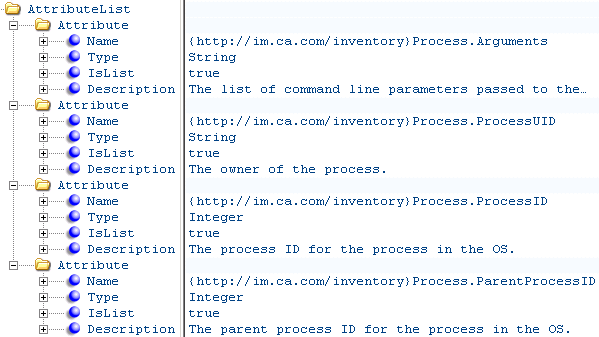
The following illustration provides an example of using AttributeList:
Provides the necessary details for synchronizing the component with CA Performance Center. ItemSyncDefinition also lists the additional attributes to send to CA Performance Center as component properties during the synchronization so that they are visible in the CA Performance Center user interface. Only the items with subtypes are synchronized, so the <ItemSyncDefinition> must define a base item type and subtypes. The base item type can be used to create a logical group and provide the default information and synchronization behavior available for all subtypes. In some use cases, a new base item type can improve performance. For most use cases, it is the “component” item type. The subtype items can provide more properties, specific to those subtypes, that must be synchronized. For example, the metric family can define a process arguments property for the process subtype. This section includes the following tags:
Defines the name of the item base type to use in CA Performance Center.
Defines the name of the item subtype to use in CA Performance Center.
Specifies the user interface label to use when displaying a single component of this type.
Specifies the user interface label to use when displaying multiple components of this type.
Specifies whether this item is a component of a device (typically set to True). When set to True, this tag indicates that this component is listed in the 'Device Components' view.
Defines whether to group components of this type in CA Performance Center. WHen set to True, a new menu entry below the 'Inventory' menu lets you list these components in their own group view.
Specifies whether to create a context type in CA Performance Center automatically for components of this type (typically set to False).
Specifies whether to create a dynamic group in CA Performance Center for components of this type (typically set to False).
Identifies the Data Aggregator instance to which the component belongs when multiple Data Aggregator instances are synchronized with CA Performance Center.
Note: This element is set to False because it is not currently supported.
Lists all the attributes that are synchronized to CA Performance Center as a property of an item type. This section includes the following tags for each attribute:
Defines the internal name for this property in CA Performance Center.
Note: The Name tag has a maximum length of 32 characters. Do not exceed this limit.
Specifies the label to display for this property in the CA Performance Center user interface.
References the component attribute populating this property during CA Performance Center synchronization.
Specifies the text justification in the CA Performance Center user interface when displaying this property.
Default: Left
Defines the width of the column (in millimeters) to use in the CA Performance Center user interface when displaying this property.
Identifies the Data Aggregator instance to which the component belongs when multiple Data Aggregator instances are synchronized with CA Performance Center.
Note: This element is set to False because it is not currently supported.
Specifies an override of the default maximum length of the inferred database type to use for this property.
Note: For more information about each XML tag, see the inline documentation provided in the MetricFamily.xsd and Component.xsd files. For code examples, see the ProcessInfoMFWithComponent.xml file. This example file defines a metric family for gathering process metrics.
If your custom metric family introduces a new component, such as Process as shown in the following illustration, you define it in this section. ComponentDefinition specifies all properties for the creation of components for a metric family. The properties include definitions of more attributes to store in the database for a component, and information about synchronization of components and their attributes with CA Performance Center.
|
Copyright © 2015 CA Technologies.
All rights reserved.
|
|