

You can define reconciliation algorithms for your custom metric family in the <ComponentReconciliation> section. The reconciliation algorithm is used to support configuration changes for monitored devices. How a device supports a given metric family can be considered its configuration. For example, the number of interfaces and their configuration represent how a device supports the Interface metric family. As changes to the interfaces of a device occur, Data Aggregator must update its representation of those interfaces to help ensure that monitoring is up-to-date. The reconciliation algorithm is applied during this configuration update.
In support of certain metric families, individual components items are created within Data Aggregator. These component items represent the device configuration in support of a given metric family. Using the Interface metric family as an example, Data Aggregator creates port component items to represent each network interface of the device.
The initial discovery and creation of component items occurs when a monitoring profile is applied to the device through a device collection. Subsequent component discoveries occur as necessary to support changes on the monitored device. Upon subsequent component discovery, the reconciliation algorithm is applied to determine the changes that are required to update the set of component items.
When the configuration of a device changes, there are four scenarios to evaluate:
The reconciliation algorithm defines a set of attributes that can be compared between existing component items and new discovery results. The values of the attributes are compared to determine which new discovery results match existing component items and which represent new or changed components. This comparison produces the following results:
You can define two types of matches in a reconciliation algorithm; ExactMatch and BestofMatch.
Indicates that a discovery result must match all of the specified attributes of a component item.
Example: ExactMatch Reconciliation Algorithm
The following example shows a reconciliation algorithm that defines an ExactMatch match type:
<ComponentReconciliation>
     <MatchAlgorithmList>
          <MatchAlgorithm>
               <AlgorithmType>Exact</AlgorithmType>
               <MatchAttributeList>
                    <MatchAttribute>
                         <Name>{http://im.ca.com/core}Item.Name</Name>
                    </MatchAttribute>
                    <MatchAttribute>
                         <Name>{http://im.ca.com/inventory}Process.Path</Name>
                    </MatchAttribute>
                    <MatchAttribute>
                         <Name>{http://im.ca.com/inventory}Process.Arguments</Name>
                    </MatchAttribute>
               </MatchAttributeList>
          </MatchAlgorithm>
     </MatchAlgorithmList>
</ComponentReconciliation>
This algorithm indicates that a discovery result must match all three attributes of an existing component item to be an exact match. If an exact match is not found, the following conditions produce these results:
Specifies the least number of attributes that must match to that same number of attributes on an existing component item. Each attribute includes a "required" key. If the "required" key is set to "true," that attribute must be one of the matched attributes.
Example: BestofMatch Reconciliation Algorithm
The following example shows a reconciliation algorithm that defines a BestofMatch match type:
<ComponentReconciliation>
     <MatchAlgorithmList>
          <MatchAlgorithm>
               <AlgorithmType>BestOf</AlgorithmType>
               <LeastMatchCount>2</LeastMatchCount>
               <MatchAttributeList>
                    <MatchAttribute>
                         <Required>true</Required>
                         <Name>{http://im.ca.com/core}Item.Name</Name>
                    </MatchAttribute>
                    <MatchAttribute>
                         <Name>{http://demo/custom}Process.Path</Name>
                    </MatchAttribute>
                    <MatchAttribute>
                         <Name>{http://demo/custom}Process.Arguments</Name>
                    </MatchAttribute>
               </MatchAttributeList>
          </MatchAlgorithm>
     </MatchAlgorithmList>
</ComponentReconciliation>
This algorithm specifies the following requirements:
Note: One of the matching attribute values must be the required attribute.
When a BestOf match algorithm is included in the reconciliation definition, the following results occur:
Note: If the number of matching attributes is the same for multiple components, the matching component item is chosen randomly. As a result, the karaf log records a warning about this condition.
You can add multiple match algorithms to a reconciliation definition. When multiple match algorithms are added, they have match precedence. The match algorithm at the top of the MatchAlgorithmList has the highest precedence. The match type at the bottom has the lowest precedence.
When more than one match type is included in the reconciliation definition, the following results occur:
For example:
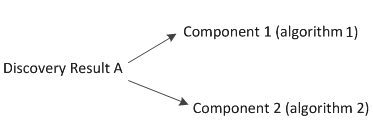
Because algorithm1 has a higher precedence, Discovery Result A matches Component1.
For example:
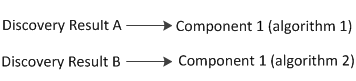
Because algorithm1 has a higher precedence, Discovery Result A matches Component 1.
For example:
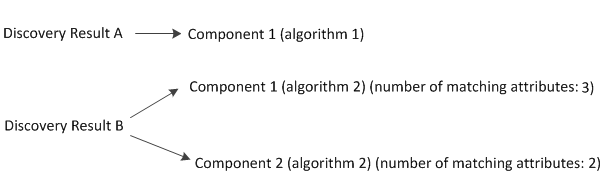
In this example, Discovery Result B matches Component 1 with more attributes than it does with Component 2. Discovery Result A matches Component 1 because it matches with a higher precedence algorithm. Therefore, the match for Component 1 goes to Discovery Result A, and Discovery Result B matches Component 2.
Note: If you do not define a reconciliation algorithm, Data Aggregator uses the Item.Name attribute to match the components.
|
Copyright © 2015 CA Technologies.
All rights reserved.
|
|