

You can filter on attributes such as the item name, description and other such attributes. For example, filter monitoring profiles by the metric families they contain. You can use this information to determine whether to add or remove metric families to or from a monitoring profile.
Follow these steps:
http://hostname:port/rest/
A list displays the available data-driven web services.
The documentation page for that web service displays.
The XSD schema opens.
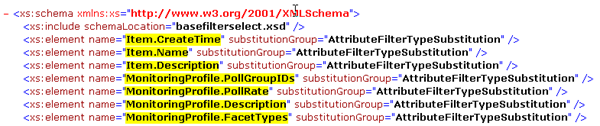
This method must define the filter criteria.
<FilterSelect xmlns:xsi="http://www.w3.org/2001/XMLSchema-instance" xsi:noNamespaceSchemaLocation="filter.xsd">
       <Filter>
                   <elementName type="CONTAINS">filter-criteria</elementName>
       </Filter>
</FilterSelect>
Specifies the actual value of the attribute.
Specifies the element name (attribute) to filter on.
Note: You can specify selection criteria also, such as poll rates only. This method is also known as Get Tunneling. For more information, see the following example.
Results are returned in the Body tab of the HTTP Response pane.
Example: Return a List of Monitoring Profiles that Contain a Metric Family Using Filter and Selection Criteria (Get Tunneling).
Enter the following URL to return the monitoring profiles that contain a metric family using poll rate as the selection criteria:
POST http://hostname:port/rest/monitoringprofiles/filtered/
<FilterSelect xmlns:xsi="http://www.w3.org/2001/XMLSchema-instance" xsi:noNamespaceSchemaLocation="filter.xsd">
                <Filter>
                       <MonitoringProfile.FacetTypes type="CONTAINS">{http://im.ca.com/normalizer}NormalizedPortInfo</MonitoringProfile.FacetTypes>
                </Filter>
                <Select use="exclude"  isa="exclude">
                   <MonitoringProfile use="exclude">
                       <PollRate use="include"/>
                   </MonitoringProfile>
                </Select>
</FilterSelect>
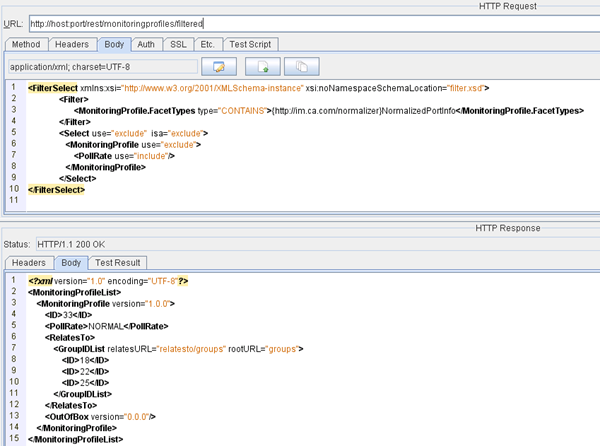
The following graphic reflects the preceding example. The response shows the monitoring profiles that contain the NormalizedPortInfo metric (filter criteria), and these profiles only contain the specified PollRate attribute (selection criteria).
|
Copyright © 2015 CA Technologies.
All rights reserved.
|
|