

Notifications can be configured for events coming from Data Aggregator to the Event Manager. The incoming events are evaluated against the conditions that you configure for the notification criteria. Only when the criteria are met does Event Manager take a notification action. If an event does not trigger a notification, the event can still be displayed in the Event List.
The following notification types are available in the Create/Edit Notifications wizard:
Sends trap notifications to a fault or network management system (NMS) in your environment, such as CA Spectrum. Supports multiple destinations. The first destination is required.
Two MIB choices are available in the Notifications wizard to provide compatibility for customer systems.
Supported roles: Users with the Administrator role can configure trap notifications.
Sends email notifications to one or more recipients when an event is raised or cleared. The email provides a link to see the context page for the device or component that triggered the alarm.
Supported roles: Users with the Create Notifications role right can configure email notifications.
A user only configures and receives notifications for events for a device in a group that the user has access to.
Consider the following information:
The following diagram shows the possible workflows for the event notification options:
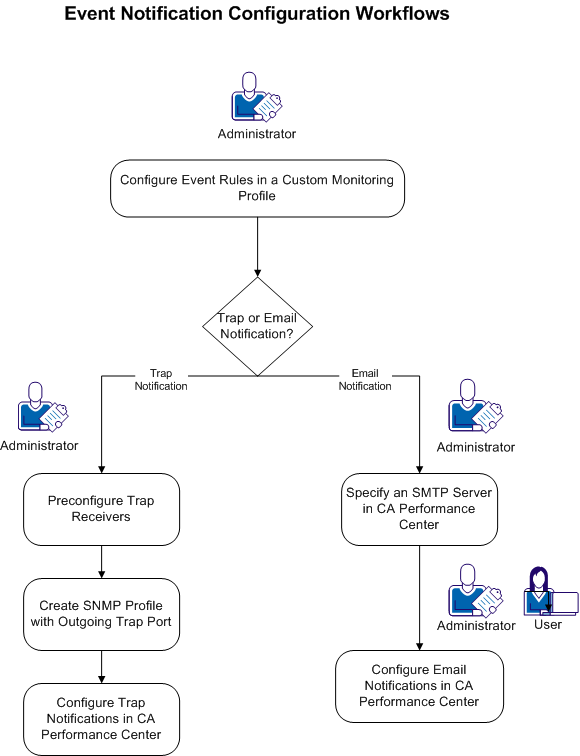
Trap or email notifications can be configured using the following process:
Note: As a Default Tenant Administrator, you can create a notification for a tenant administrator or tenant user by working in a real user context. Log in as a tenant administrator or tenant user. Alternatively, the Default Tenant administrator can administer the tenant and then proxy to the user to create a tenant-scoped notification.
Note: Administrators can also use the Event Manager API to manage notifications. Access the self-documenting interface on the Event Manager host using this URL: http://hostname:8281/EventManager/webservice/notifications/documentation.
|
Copyright © 2015 CA Technologies.
All rights reserved.
|
|