

You manage a team of IT professionals who monitor a large enterprise network. You have Global Administrator access to CA Performance Center. You have registered data sources to monitor infrastructure usage, status, and performance. In this use case, you have already created CA Performance Center user accounts for IT staff members.
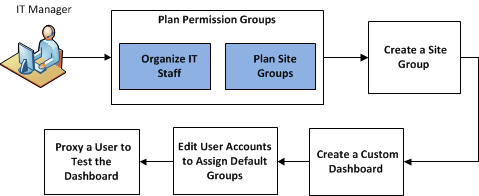
Now you want to customize CA Performance Center to support IT staff as they use CA Performance Center for their daily monitoring tasks.
CA Performance Center site groups and custom groups support the monitoring and management tasks of the IT organization. In addition to facilitating troubleshooting and optimizing reporting, groups let you assign data access permissions to users. Using permission groups, you can help the individual or team that is monitoring selected devices or systems to see performance data in a useful context.
|
Tasks |
|---|
|
Copyright © 2015 CA Technologies.
All rights reserved.
|
|