

Context pages provide specific, focused performance or status data from a narrow context, such as a single router or server. These pages are available as drill-down links or tabs from Summary dashboards.
You can customize context pages if your user account has the 'Edit Context Pages' and 'Drill into Views' role rights. The predefined Administrator and Designer roles have these role rights by default.
You can add or remove the tabbed pages that contain data views in context pages. You can edit the predefined tabs and can change the views that are displayed on those tabs. You can also rearrange tabs to change their order. Select 'Restore Tabs to Defaults' to revert changes to all tabs in the current context. All modifications are saved to the current tenant.
Follow these steps:
The first tab on the left is selected by default. The tab that is selected includes an Edit icon to let you access the Edit menu.
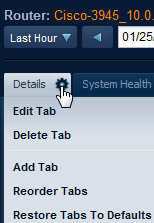
Lets you select new views for the selected tab and change the item context for the views.
Lets you delete a tab that you select from a list.
Important! No Undo or Restore feature is available. Any tab that you delete must be restored manually if required.
Lets you access options to create a tab.
Lets you move the existing tabs into different positions relative to each other.
|
Copyright © 2015 CA Technologies.
All rights reserved.
|
|